Calendar
Use the Event Calendar as a traditional month view or combine it with an agenda as a week view. The events can be rendered as labels or in a popover that is shown on day click.
Overview
The Calendar view supports everything from single to multiple week views all the way to month grids with various ways to render events.
The capabilities like recurring events, all-day, multi-day events, responsiveness are supported by the Event Calendar.
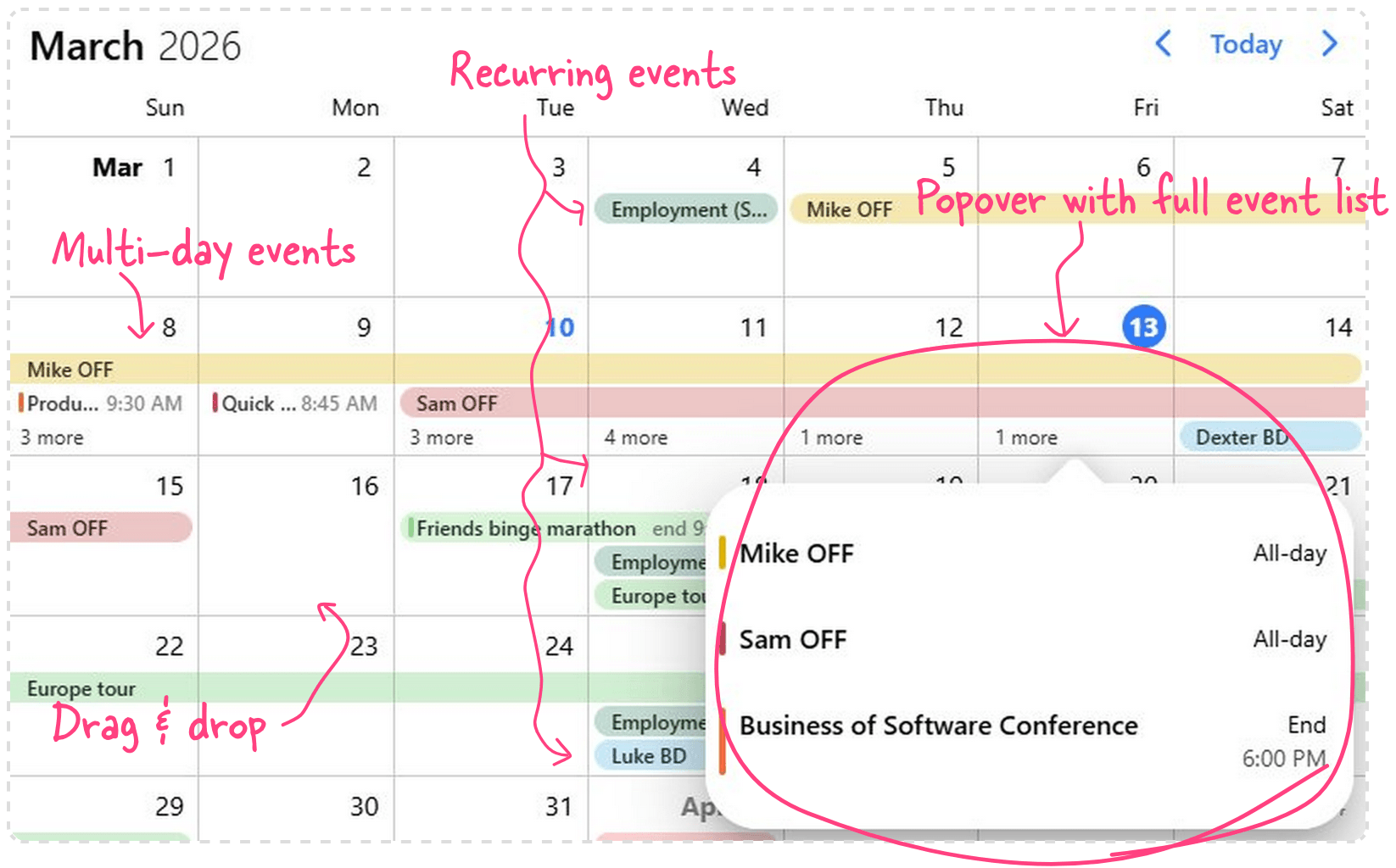
Showing the Calendar
View combination
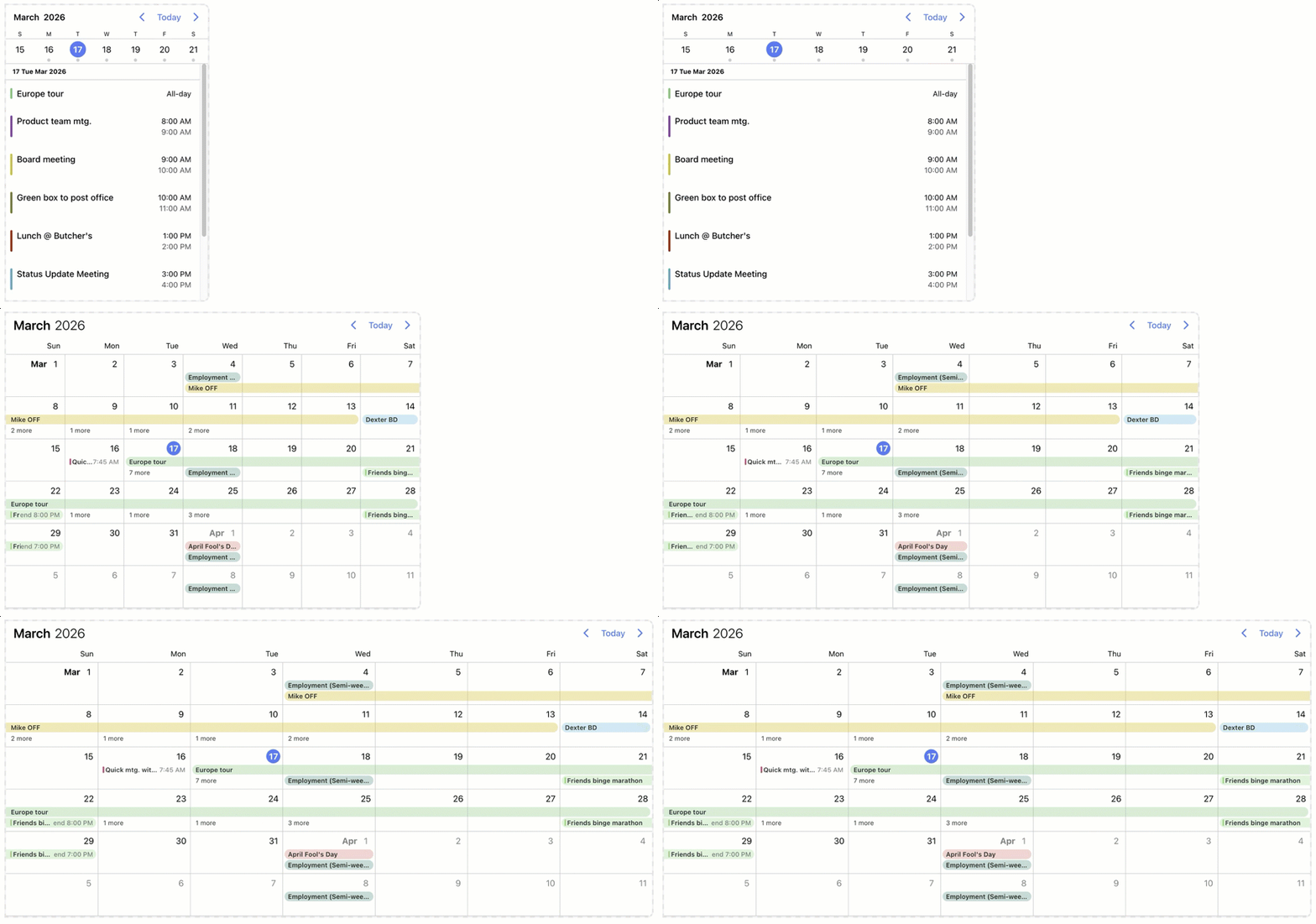
The four views - scheduler, calendar, timeline, agenda - can be used alone or combined with each-other to create the perfect user experience on mobile, desktop and on everything in-between.
For example, you can choose to render an agenda below the calendar broken up into days ordered chronologically. The view option will look like the following:
<mbsc-eventcalendar [view]="myView"></mbsc-eventcalendar>
import { Component } from '@angular/core';
import { MbscEventcalendarView } from '@mobiscroll/angular';

@Component({...})
export class MyComponent {
  myView: MbscEventcalendarView = {
    calendar: { type: 'week' },
    agenda: { type: 'day' }
  };
}
Configuring the view
The Calendar view can be configured through the view option. Below are listed the calendar object properties which can help you fine-tune this view.
<mbsc-eventcalendar [view]="myView"></mbsc-eventcalendar>
import { Component } from '@angular/core';
import { MbscEventcalendarView } from '@mobiscroll/angular';

@Component({...})
export class MyComponent {
  myView: MbscEventcalendarView = {
    calendar: {
      labels: true,
      type: 'week',
      size: 2
    }
  };
}
count
boolean
If true, it will display the number of events on the days with events.
Default value: false
eventDisplay
"fill" | "exact"
Specifies how events are displayed.
- If set to
'exact', events are displayed according to their start and end times. - If set to
'fill', events cover the entire day.
Default value: 'fill'
labels
number | boolean | "all"
Enable displaying events as labels on calendar days.
- If set to
true, events will be displayed in the available space. If there are more events for a day, than the available space, a label with "more" text will be displayed, which opens a popover showing all the events for the given day. To fit more events on a day, set the calendar height to an appropriate value, using the height option. - If set to
'all', all the events will be displayed in the calendar cell and the row height will auto-expand based on the displayed events. The view will become scrollable if the rows overflow the available height. - Specify a number to set how many events will be displayed before the "more" button in a calendar cell. The row height will auto expand until the labels count reaches the given number and after that the "x more" button will be displayed. In the case when only one event should go in the "more" popup, that event will be displayed in the place of the "x more" button.
Default value: true
outerDays
boolean
Show or hide days from previous and next months. Hiding only works for type: 'month'.
Default value: false
popover
boolean
Enable popover on days containing events. If not explicitly defined, the popover will not show up if an agenda view is also displayed. If event labels are displayed, the popover will only show up for days where the labels do not fit on the calendar, and a "more" label is present.
Default value: undefined
popoverClass
string
A CSS class that's added to the popover element. Can be used to customize the styling of the popover on a calendar basis.
scroll
"horizontal" | "vertical"
Specifies the direction of the calendar scroll. Can be 'horizontal' or 'vertical'
Default value: 'horizontal'
size
number
Specifies the number of displayed weeks/months.
Default value: 1
type
"month" | "year" | "week"
Specifies the calendar type
Default value: 'month'
weekNumbers
boolean
Show or hide week numbers.
Default value: false
Responsiveness
The Event Calendar is fully responsive. It adapts to the available space and fills the screen to look good everywhere. While you don't have to worry about the width the height can be manually adjusted with the height option. This specifies different options for different container widths, in a form of an object, where the keys are the name of the breakpoints, and the values are objects containing the options for the given breakpoint.
Use the responsive option to configure how the calendar behaves on different sized screens. The responsive option is equipped with five breakpoints:
xsmall(up to 575px),small(up to 767px),medium(up to 991px),large(up to 1199px),xlarge(from 1200px).
Also, custom breakpoints can be added if necessary:
my-custom-breakpoint: { breakpoint: 600 }(from 600px up to the next breakpoint).
The available width is queried from the container element of the component and not the browsers viewport like in css media queries.
<mbsc-eventcalendar [responsive]="responsiveSettings"></mbsc-eventcalendar>
import { Component } from '@angular/core';
import { MbscEventcalendarOptions } from '@mobiscroll/angular';

@Component({...})
export class MyComponent {
  responsiveSettings: MbscEventcalendarOptions = {
    xsmall: {
      view: {
        calendar: { type: 'week' },
        agenda: { type: 'day' }
      }
    },
    custom: { // Custom breakpoint, you can use multiple if needed, but each must have a unique name.
      breakpoint: 600,
      view: { calendar: { labels: true }}
    }
  }
}
Templating
The display of Calendar can be customized with different templating functions.
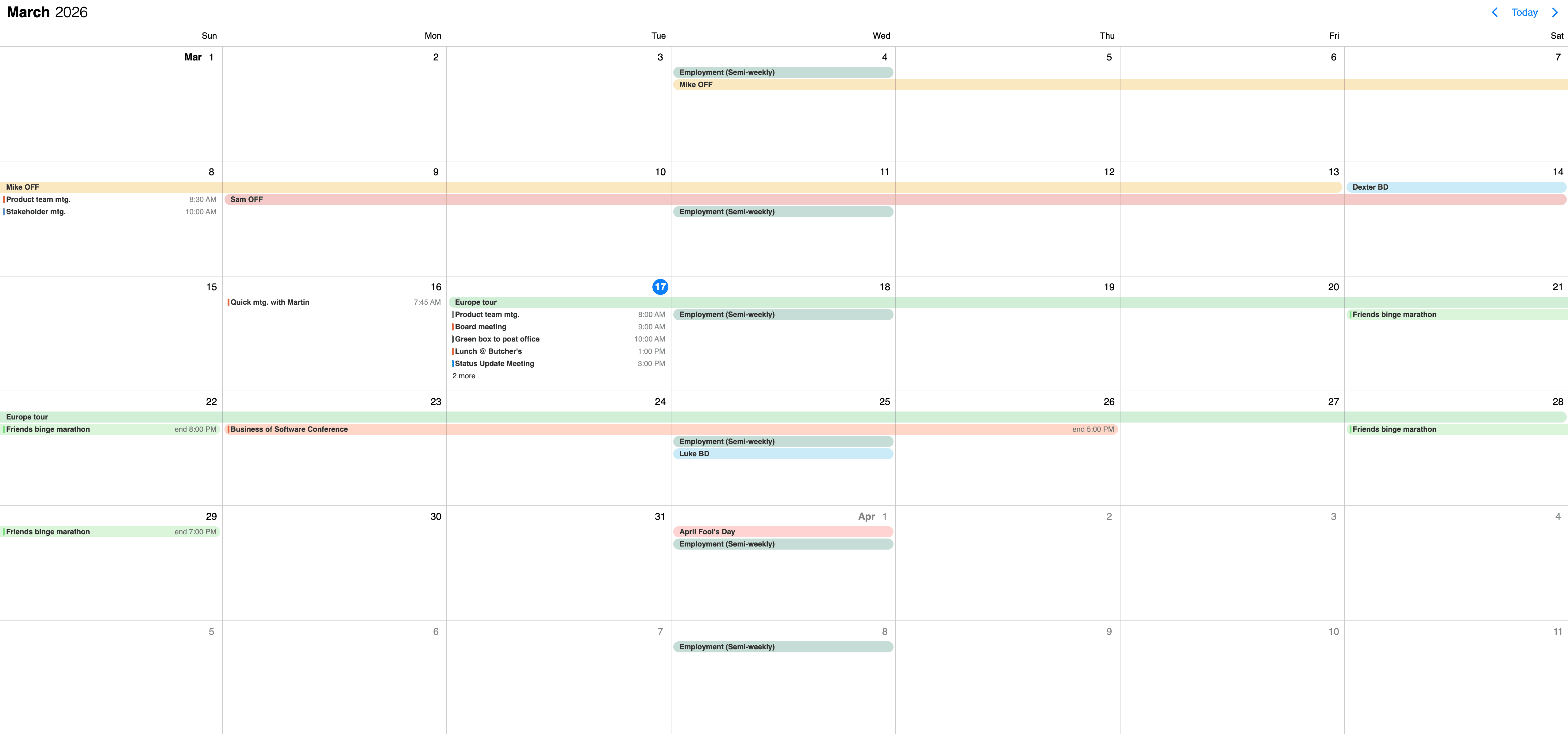
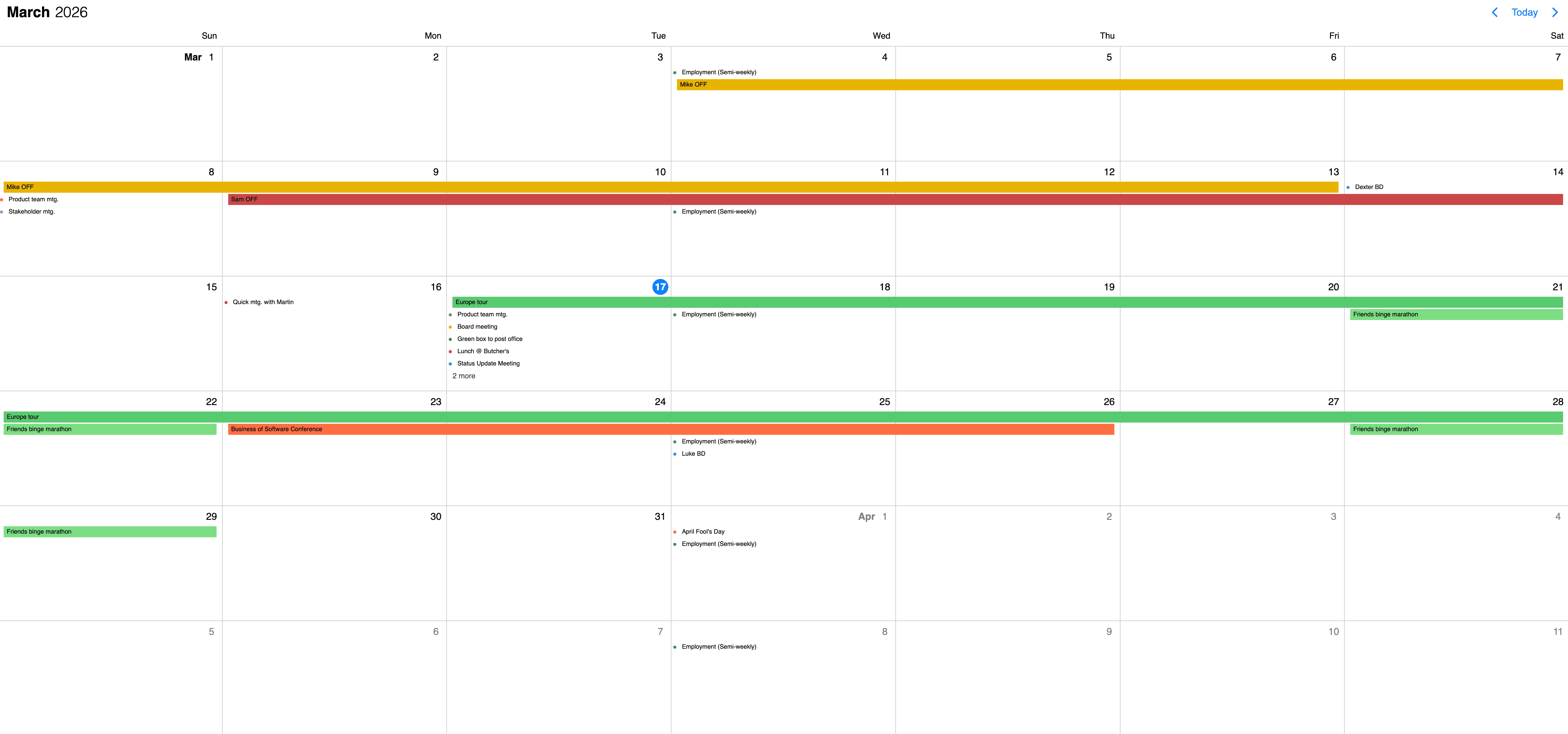
The event label and their content
There are two approaches you can take:
- Customize the label contents, that appears on the calendar - for this you will want to use the calendarEventContentTemplate option. The Event Calendar will take care of styling and you can focus on what you show inside of the label.
- Customize the labels that appear on the Calendar view - use the calendarEventTemplate option. The Event Calendar will take care of the positioning, but everything else (like background color, hover effect, etc.) is left to you.
Check out how you can style labels and their content in this example or just play with the slider below to see the differences.
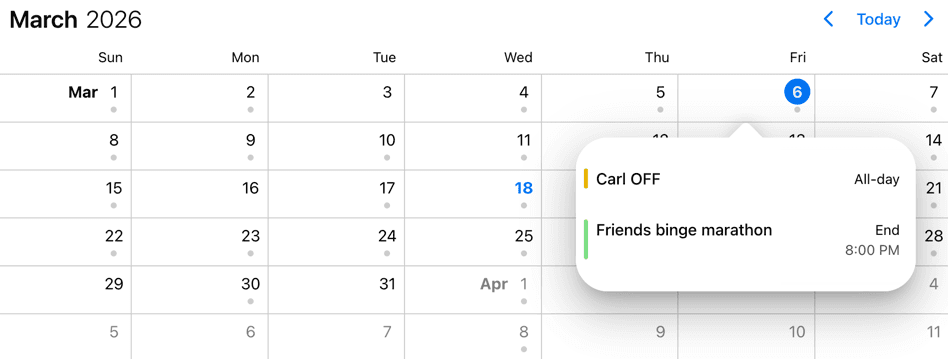
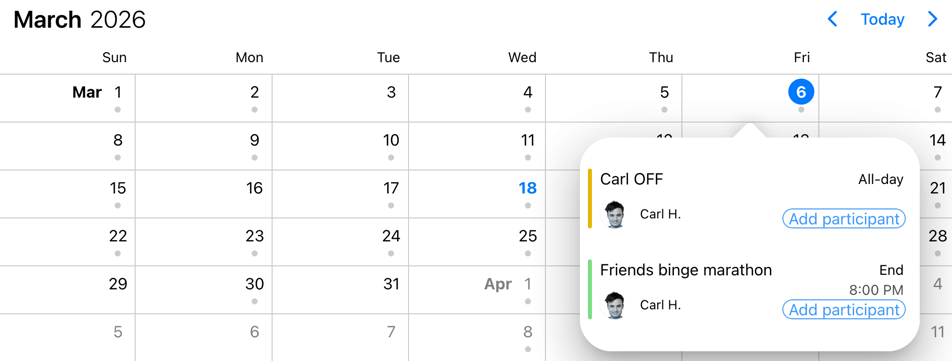
The event in popover and their content
The events can be customized in two ways:
- Customize the event content that appears on the popover - by using the popoverEventContentTemplate option. The Event Calendar will take care of styling and you can focus on what you show inside of the event.
- Customize the events that appear on the popover - with the popoverEventTemplate option. It should return the markup of the event. The Event Calendar will take care of the positioning, but everything else (like background color, hover effect, etc.) is left to you.
Check out how you can style events and their content in this example or just play with the slider below to see the differences.
The event calendar header
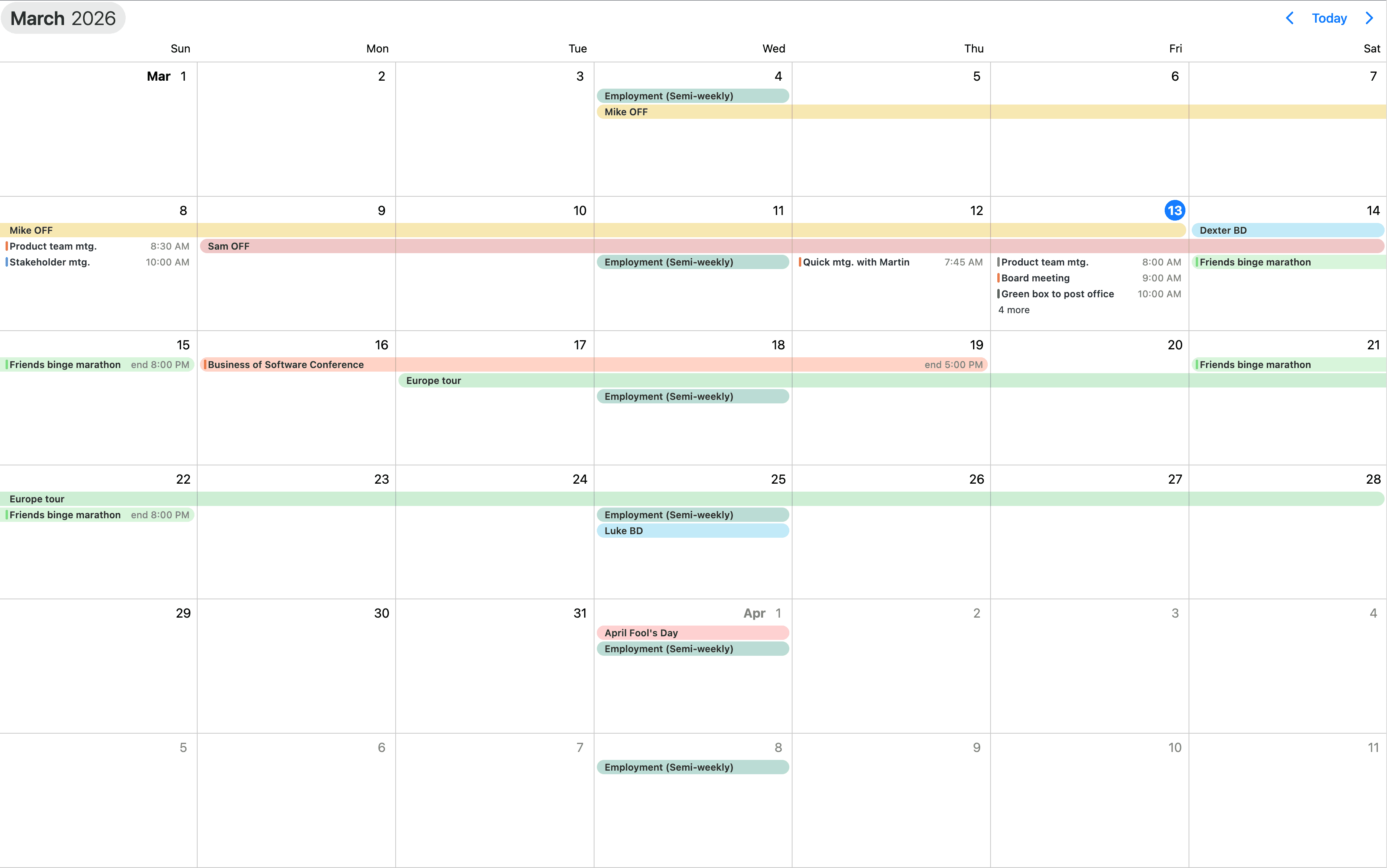
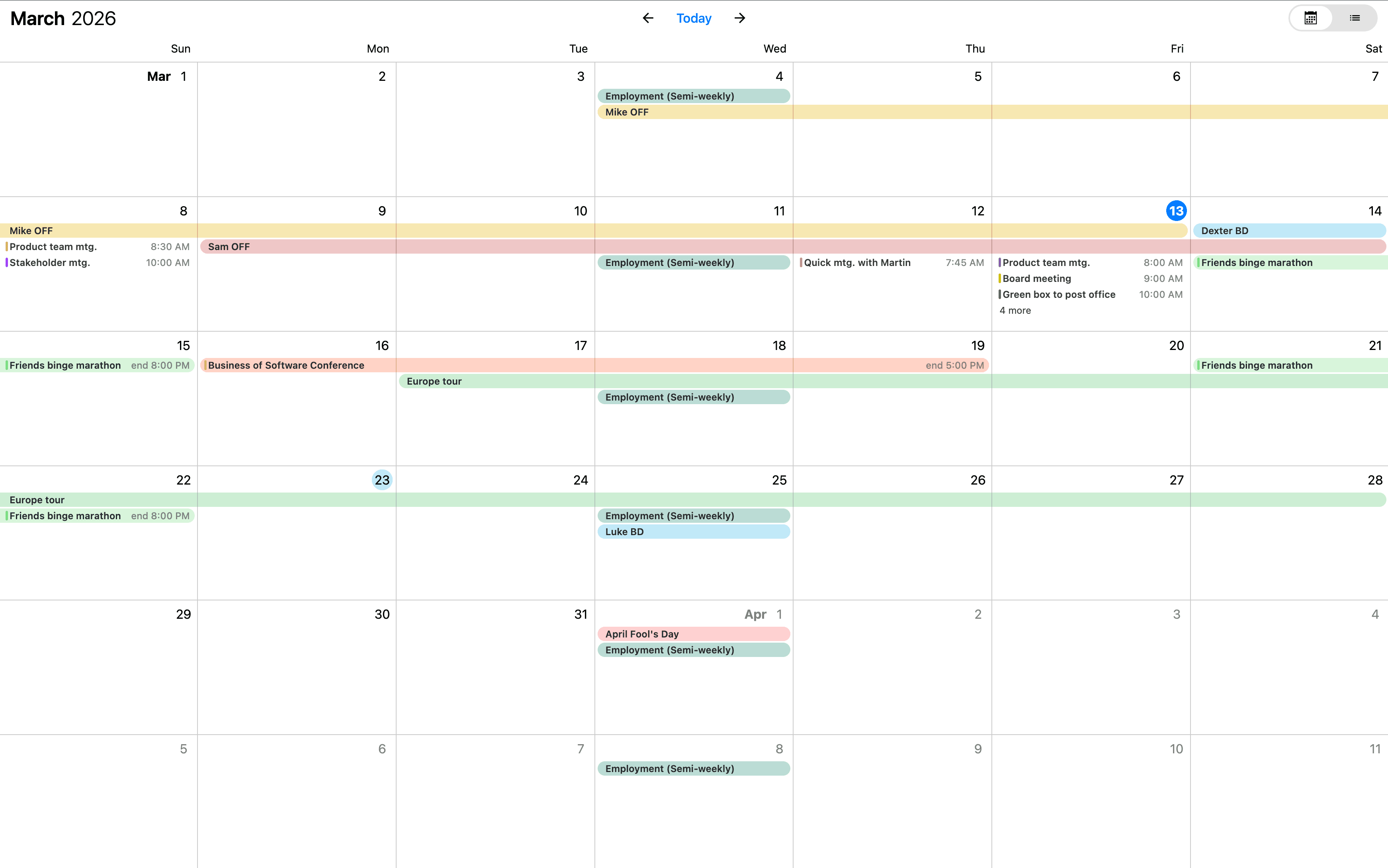
Customize how the header of the Event Calendar looks and how the components are arranged with the headerTemplate option. It takes a function that should return the desired markup. In the returned markup, you can use custom html as well as the built in header components of the calendar.
While fully customizing the header is very usefull, sometimes it's desireable to customize only parts of it. In this case you can take advantage of the default header's building blocks. These components let you put toghether the header you want, while you don't have to worry about the functionality behind them.
Check out how you can style the header in this example or just play with the slider below to see the differences.
Event order
The rendered event order is determined by the following two concepts:
- Event data order
- Event layout
The combination of these concepts results in the final rendered event order.
Event data order
The sequence in which events are processed before being passed to the layout algorithm. The default ordering rules are as follows:
- All-day events are placed at the top.
- Non-all-day events follow, sorted by their start times.
- Events with the same start time are further ordered alphabetically by their titles.
This default order can be modified using the order property in the event event data. The order property takes precedence over the default rules. If two events have the same order value, the default rules apply. For more complex ordering requirements, the eventOrder option can be used. This option accepts a function that compares two events and returns an order (-1 or 1).
Event layout
The event layout process determines the visual positioning and dimensions of events. This is a built-in functionality and cannot be altered externally. The layout algorithm processes the sorted event list and calculates each event's position and size. The algorithm follows these steps:
- The first event is placed in the first position of the event track.
- If two or more events overlap in their start/end times, the later event is placed in the next event track, positioned below to the previous event.
- If a subsequent event does not overlap with any already added events, it is placed back in the first event track.
- This process continues until all events are positioned within their respective rows.
API
Here is a comprehensive list of all the specific options, events and methods of the Event Calendar view.
Options
Explore the following API options that help you easily configure the Event Calendar.
actionableEvents
boolean
Specifies if the events on the agenda and inside the calendar popover are actionable or not.
If actionable, the event items will have hover and active states, and pointer cursor.
Set to false when custom event rendering is used and the event list items contain other actionable elements, e.g. buttons.
Default value: true
clickToCreate
boolean | "double" | "single"
Enable new event creation on click. If true or 'double', a new event will be created only with a double click
and with the 'single' value the event will be created instantly with a single click.
This option will only work on desktop environment where mouse events are fired. It will also allow deleting of the focused events using the Delete or Backspace key.
In touch environment a long tap should be used to create a new event and it is controlled by the dragToCreate option.
Using the extendDefaultEvent option extra properties can be set for the created event.
The event deletion functionality can be overwritten using the eventDelete option.
Default value: undefined
colors
Array<MbscCalendarColor>
Specifies the color for certain dates or date ranges on the calendar.
The MbscCalendarColor type has the following properties:
allDay: boolean - Specifies whether the date you want to color is all day or not.background: string - Background color of the cell. It can be any valid CSS color ('red','#ff0000','rgb(255, 0, 0)', etc.).cellCssClass: string - CSS class for the day cell. Only applicable for the calendar view.cssClass: string - Specifies a custom CSS class for the color. Useful when customization is needed for the background of cells and time ranges. Only applicable for the timeline and scheduler views.date: string | object | Date - Specifies a single date for the colorend: string | object | Date - Specifies the end date/time of a date/time range for the colorhighlight: string - Highlight color of the day, can be any valid CSS color ('red','#ff0000','rgb(255, 0, 0)', etc.).recurring: string | MbscRecurrenceRule - Specifies a recurrence rule for handling recurring days.recurringException: string | object | Date | Array<string | object | Date> - Exception dates of the recurring rule. Useful when specific dates need to be skipped from the rule.recurringExceptionRule: string | MbscRecurrenceRule - Exception rule of the recurring rule. Useful when recurring dates need to be skipped from the rule.resource: string | number | Array<string | number> - In case of the timeline and scheduler view of the Eventcalendar, specifies the resource ids for the color. The color will be displayed only on the specified resource. If there is no resource defined, it will be applied to every resource.slot: string | number - In case of the timeline view of the Eventcalendar, specifies the slot id for the color. The color will be displayed only on the specified slot. If there is no slot defined, it will be applied to every slot.start: string | object | Date - Specifies the start date/time of a date/time range for the colortextColor: string - A color applied on the text.timezone: string - Timezone of the colortitle: string - A title that will be displayed on the item.
The colored range will be considered all-day if:
- the
allDayproperty is explicitly set. - the
start/endproperties are not specified, only thedate.
The dates can be specified as JavaScript Date objects, ISO 8601 strings, or moment objects.
For Javascript Date objects the month numbers are zero based. Like: 0 - January, 1 - February ... 11 - December.
[
  { date: new Date(2020, 2, 23), background: 'pink' },
  { date: new Date(2020, 2, 24), background: 'green' },
  { background: '#ff0000', recurring: { repeat: 'weekly', weekDays: 'SU' } },
  { background: 'yellow', recurring: { repeat: 'weekly', weekDays: 'SA' } }
]
Default value: undefined
context
string | HTMLElement
The DOM element in which the popups (event popover, year and month picker) are rendered. Can be a selector string or a DOM element.
Default value: 'body'
cssClass
string
Specifies a custom CSS class for the component.
Default value: undefined
data
Array<MbscCalendarEvent>
The events for the Eventcalendar.
The MbscCalendarEvent type has the following properties:
allDay: boolean - Specifies if the event is all day or not.bufferAfter: number - Defines a buffer time in minutes that will be displayed after the end of the event.bufferBefore: number - Defines a buffer time in minutes that will be displayed before the start of the event.cellCssClass: string - CSS class for the day cell. Only applicable for the calendar view.color: string - Background color of the eventcssClass: string - Specifies a custom CSS class that is applied to the event. Useful when customization is needed on the event level. For example: setting the width for specific events.date: string | object | Date - Specifies a single date for the eventdragBetweenResources: boolean - Specifies whether the event is movable across resources.dragBetweenSlots: boolean - Specifies whether the event is movable across across slots.dragInTime: boolean - Specifies whether the event is movable in time.editable: boolean - Specifies if an event is editable or not. If false, drag & drop and resize is not allowed.end: string | object | Date - Specifies the end date/time of a date/time range for the eventid: string | number - A unique id for the event. If not specified, the event will get a generated id.order: number - Specifies the order of the event in the array. Has precedence over the default ordering rules.overlap: boolean - Specifies whether the event can be overlapped. Has precedence over theeventOverlapproperty of the resource and the eventOverlap option.recurring: string | MbscRecurrenceRule - Specifies a recurrence rule for handling recurring events.recurringException: string | object | Date | Array<string | object | Date> - Exception dates of the recurring rule. Useful when specific dates need to be skipped from the rule.recurringExceptionRule: string | MbscRecurrenceRule - Exception rule of the recurring rule. Useful when recurring dates need to be skipped from the rule.resize: boolean - Specifies whether the event is resizable. Has precedence over theeventResizeproperty of the resource and the dragToResize option.resource: string | number | Array<string | number> - In case of the timeline and scheduler view of the Eventcalendar, specifies the resource ids for the event. The event will be displayed only on the specified resource. If there is no resource defined, it will be displayed on every resource.slot: string | number - In case of the timeline view of the Eventcalendar, specifies the slot id for the event. The event will be displayed only on the specified slot. If there is no slot defined, it will be displayed on every slot.start: string | object | Date - Specifies the start date/time of a date/time range for the eventtextColor: string - A color applied on the text.timezone: string - Timezone of the eventtitle: string - The title of the event.tooltip: string - The tooltip text of the event.
The dates can be specified as JavaScript Date objects, ISO 8601 strings, or moment objects.
For Javascript Date objects the month numbers are zero based. Like: 0 - January, 1 - February ... 11 - December.
The event objects may have additional custom properties as well. The custom properties are not used by the event calendar, but they are kept and will be available anywhere the event objects are used. E.g. the onEventClick event will receive the event object as argument, containing the custom properties as well.
Use the getEvents method to get the events between two dates.
data: [
  {
    start: new Date(2021, 5, 23),
    end: new Date(2021, 5, 30),
    title: 'Conference',
    allDay: true,
    color: 'red'
  },
  {
    title: 'Work project',
    recurring: {
      repeat: 'daily',
      until: '2021-04-01'
    },
    recurringException: ['2021-03-15', '2021-03-25'],
    recurringExceptionRule: {
      repeat: 'weekly',
      weekDays: 'SA,SU'
    }
  }
]
Default value: undefined
dataTimezone
string
The timezone in which the data is interpreted. If the data contains timezone information
(when the ISO string has a timezone offset, e.g. "2021-03-28T01:00:00Z" or "2021-03-28T03:00:00+03:00")
then the data's timezone is used instead.
When using timezones, the exclusiveEndDates option is also turned on by default.
When using anything other than the default ('local'), a timezone plugin
must be also passed to the component.
Possible values:
'local'- The system's local timezone.'utc'- UTC (Universal Coordinated Time) timezone.- Timezone name - The timezone name from the
IANA time zone database, e.g.
"America/New_York".
If not specified, it defaults to the displayTimezone.
Default value: undefined
defaultSelectedDate
Specifies the initial selected date on the calendar.
For views, where time is also displayed, the view will be scrolled to the specified time. If the time part is not explicitly specified, it defaults to the start of the day.
Default value: undefined
displayTimezone
string
The timezone in which the data is displayed.
When using timezones, the exclusiveEndDates option is also turned on by default.
When using anything other than the default ('local'), a timezone plugin
must be also passed to the component.
Possible values:
'local'- The system's local timezone.'utc'- UTC (Universal Coordinated Time) timezone.- Timezone name - The timezone name from the
IANA time zone database, e.g.
"America/New_York".
Default value: 'local'
dragInTime
boolean
If false, the events will not be moveable in time.
In case of the scheduler and timeline views events events can still be moved between resources.
To control movement between resources, use the dragBetweenResources option.
Consider that dragToMove has to be enabled.
Default value: true
dragToCreate
boolean
If true, dragging on an empty cell will create a new event.
It will also allow deleting of the focused events using the Delete or Backspace key.
The title of the new event can be specified with the newEventText option.
Using the extendDefaultEvent option extra properties can be set for the created event.
The event deletion functionality can be overwritten using the eventDelete option.
Default value: undefined
dragToMove
boolean
If true, the events will be moveable.
Default value: undefined
dragToResize
boolean
If true, the events will be resizable.
Default value: undefined
eventDelete
boolean
Enables or disables event deletion. When true, the focused event will be deleted on pressing the Delete or Backspace
keys on the keyboard.
By default the event deletion depends on the clickToCreate and dragToCreate options.
If either of those are true, and no eventDelete option is set, then event deletion is also enabled, otherwise not.
Default value: undefined
eventOrder
(event1: MbscCalendarEvent, event2: MbscCalendarEvent) => number
Determines the ordering of the events within the same day. Can be a function that accepts two event objects as arguments and should return -1 or 1.
If not specified, the default order is:
- all day events
- rest of events, sorted by start time; events with identical start times, will be ordered alphabetically based on their title
Default value: undefined
eventOverlap
boolean
If false, the events cannot overlap.
Default value: true
exclusiveEndDates
boolean
If true, the Eventcalendar will work in exclusive end dates mode,
meaning that the last moment of the range (event, invalid, colors, etc.) is not part of the range.
E.g. end: '2021-07-03T00:00' means that the event ends on 2nd of July and will not be displayed on 3rd of July.
When using timezones, the exclusiveEndDates option will default to true.
extendDefaultEvent
(args: MbscNewEventData) => void | MbscCalendarEvent
Use this option to set properties to the new event created with click or drag. The event creation is handled by the clickToCreate and dragToCreate options. It takes a function that should return the properties for the new event. The argument object passed to this function has the following properties:
start: Date - The date when the newly created event will start.resource: string | number - The id of the resource where the event creation started.
extendDefaultEvent: (args) => {
  return {
    color: args.resource === 'admin' ? 'green' : 'red',
    title: 'My event',
  };
}
Default value: undefined
externalDrag
boolean
If true, external drag & drop is allowed and events can be dragged outside of the component view.
Default value: undefined
externalDrop
boolean
If true, external events can be dragged into the view.
Default value: undefined
height
string | number
Sets the height of the component.
The height of the calendar view impacts the number of labels that fit into a table cell. A "show more" label will be displayed for events that don't fit.
Default value: undefined
immutableData
boolean
If true, the Eventcalendar will work in immutable mode.
In this mode the component won't update the data directly,
only fire the necessary lifecycle events, where the original data can be updated manually.
Default value: undefined
invalid
Array<MbscDateType> | Array<MbscCalendarInvalid>
An array containing the invalid values. Can contain dates, or objects with the following properties:
allDay: boolean - Specifies whether the invalid range is all day or not.start: Date | string | object - Start of the invalid range.end: Date, string | object - End of the invalid range.recurring: string | object - Recurrence rule for recurring invalid ranges.recurringException: string | object | Array<string | object> - Exception dates of the recurring rule. Useful when specific dates need to be skipped from the rule.recurringExceptionRule: string | object - Exception rule of the recurring rule. Useful when recurring dates need to be skipped from the rule.resource: string | number | Array<string | number> - Specifies the resource ids for the invalid range. The invalid range will be displayed only in the specified resource. If there is no resource defined, the invalid range will be displayed in every resource.slot: string | number - Specifies the slot id for the invalid range. The invalid range will be displayed only in the specified slot. If there is no slot defined, the invalid range will be displayed in every slot.title: string - Text which will be displayed for the invalid range. Only applicable for the timeline and scheduler views.
The dates can be specified as JavaScript Date objects, ISO 8601 strings, or moment objects.
For Javascript Date objects the month numbers are zero based. Like: 0 - January, 1 - February ... 11 - December.
[
  // Passing exact dates and times
  new Date(2021, 1, 7), // Date object
  '2021-10-15T12:00', // ISO 8601 string
  moment('2020-12-25'), // moment object

  // Passing invalid ranges
  {
    // ISO 8601 strings
    start: '2021-10-15T12:00',
    end: '2021-10-18T13:00',
    title: 'Company 10th anniversary',
  },
  {
    // Date objects
    allDay: true,
    start: new Date(2021, 2, 7),
    end: new Date(2021, 2, 9),
    title: 'Conference for the whole team',
  },
  {
    // Time range with recurrence
    start: '13:00',
    end: '12:00',
    recurring: { repeat: 'weekly', weekDays: 'MO,TU,WE,TH,FR' },
    title: 'Lunch break',
  },
  {
    // Disable weekends
    recurring: {
      repeat: 'weekly',
      weekDays: 'SA,SU'
    }
  }
]
Default value: undefined
The MbscCalendarInvalid type has the following properties:
allDay: boolean - If true the specified invalid will cover the whole day.cssClass: string - Specifies a custom CSS class for the invalid range. Useful when customization is needed for the background of cells and time ranges. Only applicable for the timeline and scheduler views.end: MbscDateType - Specifies the end of the invalid range.recurring: string | MbscRecurrenceRule - Recurrence rule for recurring invalid ranges.recurringException: MbscDateType | Array<MbscDateType> - Specifies recurring exceptions. Useful when specific dates need to be skipped from the rule.recurringExceptionRule: string | MbscRecurrenceRule - Specifies a recurrence exception rule. Useful when recurring dates need to be skipped from the rule.resource: string | number | Array<string | number> - In case of the timeline and scheduler view of the Eventcalendar, specifies the resource ids for the invalid range. The invalid range will be displayed only on the specified resource. If there is no resource defined, it will be applied to every resource.slot: string | number - In case of the timeline view of the Eventcalendar, specifies the slot id for the invalid range. The invalid range will be displayed only on the specified slot. If there is no slot defined, it will be applied to every slot.start: MbscDateType - Specifies the start of the invalid range.timezone: string - Timezone of the invalidtitle: string - Text which will be displayed for the invalid range. Only applicable for the timeline and scheduler views.
invalidateEvent
"strict" | "start-end"
Specifies how to validate events against invalid ranges on create/move/resize:
'strict'- The event cannot intersect with an invalid range at all.- `'start-end' - The event start and end cannot be inside an invalid range.
Default value: 'strict'
labels
Array<MbscCalendarLabel>
Specifies labels for calendar days.
The MbscCalendarLabel type has the following properties:
cellCssClass: string - CSS class for the day cell. Only applicable for the calendar view.color: string - Background color of the label.cssClass: string - Specifies a custom CSS class that is applied to the label.date: string | object | Date - Specifies a single date for the labelend: string | object | Date - Specifies the end date/time of a date/time range for the labelorder: number - Specifies the order of the label in the array. Has precedence over the default ordering rules.recurring: string | MbscRecurrenceRule - Specifies a recurrence rule for handling recurring days.recurringException: string | object | Date | Array<string | object | Date> - Exception dates of the recurring rule. Useful when specific dates need to be skipped from the rule.recurringExceptionRule: string | MbscRecurrenceRule - Exception rule of the recurring rule. Useful when recurring dates need to be skipped from the rule.start: string | object | Date - Specifies the start date/time of a date/time range for the labeltextColor: string - A color applied on the text.title: string - The title of the label.tooltip: string - Tooltip for the label
The dates can be specified as JavaScript Date objects, ISO 8601 strings, or moment objects.
For Javascript Date objects the month numbers are zero based. Like: 0 - January, 1 - February ... 11 - December.
The labels can be combined with the colors option.
[
  {
    start: new Date(2020, 2, 23),
    end: new Date(2020, 2, 24),
    text: 'Conference',
    color: 'red'
  },
  {
    text: 'Christmas',
    recurring: { repeat: 'yearly', month: 12, day: 24 }
  }
]
Default value: undefined
marked
Array<MbscCalendarMarked>
Mark certain dates on the calendar. An array containing dates, or objects with the following properties:
The MbscCalendarMarked type has the following properties:
cellCssClass: string - CSS class for the day cell. Only applicable for the calendar view.color: string - Color of the mark.date: string | object | Date - Specifies a single date when this is applicableend: string | object | Date - Specifies the end date/time of a date/time range when this is applicablemarkCssClass: string - CSS class for the mark.recurring: string | MbscRecurrenceRule - Specifies a recurrence rule for handling recurring days.recurringException: string | object | Date | Array<string | object | Date> - Exception dates of the recurring rule. Useful when specific dates need to be skipped from the rule.recurringExceptionRule: string | MbscRecurrenceRule - Exception rule of the recurring rule. Useful when recurring dates need to be skipped from the rule.start: string | object | Date - Specifies the start date/time of a date/time range when this is applicabletextColor: string - A color applied on the text.title: string - A title that will be displayed on the item.
The dates can be specified as JavaScript Date objects, ISO 8601 strings, or moment objects.
For Javascript Date objects the month numbers are zero based. Like: 0 - January, 1 - February ... 11 - December.
The marked days can be combined with the colors option.
[
  new Date(2020, 2, 15),
  new Date(2020, 2, 22),
  {
    start: new Date(2020, 2, 23),
    end: new Date(2020, 2, 24),
    color: 'red'
  },
  {
    color: 'green',
    recurring: { repeat: 'yearly', month: 12, day: 24 }
  }
]
Default value: undefined
max
Maximum date and time. The calendar cannot be navigated beyond the specified maximum date. If navigation is needed, but event creation should not be allowed after a specific date, use the invalid option with daily recurrence starting from the specific date.
Default value: undefined
min
Minimum date and time. The calendar cannot be navigated beyond the specified minimum date. If navigation is needed, but event creation should not be allowed before a specific date, use the invalid option with daily recurrence until the specific date.
Default value: undefined
modules
Array<IModule>
Additional modules can be added to the eventcalendar. The option receives an array of module objects. For example, the print module can be added through this option.
// import the print module
import { print } from '@mobiscroll/print';

// later on, add it to the modules array:
modules: [print]
refDate
Specifies the reference date for the view calculation, when multiple days, weeks, months or years are displayed. If not specified, will be today's date.
It denotes the reference point when calculating the pages going in the future and in the past.
For example if the view type is day, the view size is 3, and the current date is 01/16/2024,
the pages are calculated from this date, so the initial page will contain [01/16/2024, 01/16/2024, 01/17/2024],
the next page [01/18/2024, 01/19/2024, 01/20/2024] and so on.
In case of day view, the reference point will be exactly the specified date. For week, month and year views the reference point will be the start of the week, month or year of the specified day.
Changing the reference date will not navigate the calendar to the specified date, it only recalculates the pages from the new reference date. To navigate the view to a specified date and time, use the selectedDate option.
Default value: undefined
responsive
MbscResponsiveOptions<MbscEventcalendarOptions>
Specifies different options for different container widths, in a form of an object, where the keys are the name of the breakpoints, and the values are objects containing the options for the given breakpoint.
The available width is queried from the container element of the component and not the browsers viewport like in css media queries
There are five predefined breakpoints:
xsmall- min-width: 0pxsmall- min-width: 576pxmedium- min-width: 768pxlarge- min-width: 992pxxlarge- min-width: 1200px
Custom breakpoints can be defined by passing an object containing the breakpoint property specifying the min-width in pixels.
Example:
responsive: {
  small: {
    display: 'bottom'
  },
  custom: { // Custom breakpoint, you can use multiple, but each must have a unique name
    breakpoint: 600,
    display: 'center'
  },
  large: {
    display: 'anchored'
  }
}
Default value: undefined
selectMultipleEvents
boolean
When true, enables multiple event selection on the calendar.
Default value: false
selectedDate
Specifies the selected date on the calendar. This can be changed programmatically and when changed the calendar will automatically navigate to the specified date.
For views, where time is also displayed, the view will be scrolled to the specified time. If the time part is not explicitly specified, it defaults to the start of the day.
This does not change the reference date that defines the reference point of the navigation pages. To change the reference point for the navigation (e.g. start the paging from the newly selected date) use the refDate option.
You also need to pass a handler for the onSelectedDateChange event to update the selected date when the date is changed from the calendar.
Default value: undefined
selectedEvents
Array<MbscCalendarEvent>
Specifies the selected events on the calendar. The onSelectedEventsChange event will be fired when the selected events change from the calendar.
The MbscCalendarEvent type has the following properties:
allDay: boolean - Specifies if the event is all day or not.bufferAfter: number - Defines a buffer time in minutes that will be displayed after the end of the event.bufferBefore: number - Defines a buffer time in minutes that will be displayed before the start of the event.cellCssClass: string - CSS class for the day cell. Only applicable for the calendar view.color: string - Background color of the eventcssClass: string - Specifies a custom CSS class that is applied to the event. Useful when customization is needed on the event level. For example: setting the width for specific events.date: string | object | Date - Specifies a single date for the eventdragBetweenResources: boolean - Specifies whether the event is movable across resources.dragBetweenSlots: boolean - Specifies whether the event is movable across across slots.dragInTime: boolean - Specifies whether the event is movable in time.editable: boolean - Specifies if an event is editable or not. If false, drag & drop and resize is not allowed.end: string | object | Date - Specifies the end date/time of a date/time range for the eventid: string | number - A unique id for the event. If not specified, the event will get a generated id.order: number - Specifies the order of the event in the array. Has precedence over the default ordering rules.overlap: boolean - Specifies whether the event can be overlapped. Has precedence over theeventOverlapproperty of the resource and the eventOverlap option.recurring: string | MbscRecurrenceRule - Specifies a recurrence rule for handling recurring events.recurringException: string | object | Date | Array<string | object | Date> - Exception dates of the recurring rule. Useful when specific dates need to be skipped from the rule.recurringExceptionRule: string | MbscRecurrenceRule - Exception rule of the recurring rule. Useful when recurring dates need to be skipped from the rule.resize: boolean - Specifies whether the event is resizable. Has precedence over theeventResizeproperty of the resource and the dragToResize option.resource: string | number | Array<string | number> - In case of the timeline and scheduler view of the Eventcalendar, specifies the resource ids for the event. The event will be displayed only on the specified resource. If there is no resource defined, it will be displayed on every resource.slot: string | number - In case of the timeline view of the Eventcalendar, specifies the slot id for the event. The event will be displayed only on the specified slot. If there is no slot defined, it will be displayed on every slot.start: string | object | Date - Specifies the start date/time of a date/time range for the eventtextColor: string - A color applied on the text.timezone: string - Timezone of the eventtitle: string - The title of the event.tooltip: string - The tooltip text of the event.
Default value: undefined
separator
string
Separator between date and time in the formatted date string.
Default value: ' '
showControls
boolean
Show or hide the calendar header controls: the previous and next buttons, and the current view button together with the year and month picker.
Default value: true
showEventBuffer
boolean
If true, it will display the event buffers defined in the event data.
Default value: true
showEventTooltip
boolean
If false, it will hide the native tooltip that shows up when hovering over an event.
Default value: true
theme
string
Specifies the visual appearance of the component.
If it is 'auto' or undefined, the theme will automatically be chosen based on the platform.
If custom themes are also present, they will take precedence over the built in themes, e.g. if there's an iOS based custom theme,
it will be chosen on the iOS platform instead of the default iOS theme.
Supplied themes:
'ios'- iOS theme'material'- Material theme'windows'- Windows theme
It's possible to modify theme colors or create custom themes.
Make sure that the theme you set is included in the downloaded package.
Default value: undefined
themeVariant
"auto" | "light" | "dark"
Controls which variant of the theme will be used (light or dark).
Possible values:
'light'- Use the light variant of the theme.'dark'- Use the dark variant of the theme.'auto'orundefined- Detect the preferred system theme on devices where this is supported.
To use the option with custom themes, make sure to create two custom themes, where the dark version has the same name as the light one,
suffixed with '-dark', e.g.: 'my-theme' and 'my-theme-dark'.
Default value: undefined
timezonePlugin
Specifies the timezone plugin, which can handle the timezone conversions.
By default the component uses the local timezone of the browser to interpret dates. If you want to interpret dates a different timezone, you will need an external library to handle the timezone conversions. There are two supported libraries: moment-timezone and luxon.
You can specify either the dataTimezone or the displayTimezone or both.
Depending on which external library you use you can pass either the momentTimezone, dayjsTimezone or luxonTimezone
objects. These objects can be imported from the mobiscroll bundle.
Default value: undefined
The MbscTimezonePlugin type has the following properties:
createDate: (s: any, year: string | number | Date | MbscTimezonedDate, month: number, date: number, h: number, min: number, sec: number, ms: number) => MbscTimezonedDate -parse: (date: string | number, s: any) => MbscTimezonedDate -
width
string | number
Sets the width of the component.
Default value: undefined
Events
The Event Calendar ships with different event hooks for deep customization. Events are triggered through the lifecycle of the component where you can tie in custom functionality and code.
onCellClick
(args: MbscCellClickEvent, inst: EventcalendarBase) => void
Triggered when a cell is clicked on the calendar view, scheduler grid, or timeline grid.
Parameters:
-
args - The event object has the following properties:
date: Date - The date of the clicked cell.domEvent: Event - The DOM event of the click.events: Array<MbscCalendarEvent> - The events for the clicked date.resource: string | number - The id of the resource where the cell was clicked, if resources are set.selected: boolean - Specifies if the day is currently selected or not (before it was clicked).source: 'calendar' | 'scheduler' | 'timeline' - The view where the cell was clicked.target: HTMLElement - The DOM element of the clicked cell.
-
inst - The component instance.
onCellDoubleClick
(args: MbscCellClickEvent, inst: EventcalendarBase) => void
Triggered when a cell is double-clicked on the calendar view, scheduler grid, or timeline grid.
Parameters:
-
args - The event argument with the following properties:
date: Date - The date of the clicked cell.domEvent: Event - The DOM event of the click.events: Array<MbscCalendarEvent> - The events for the clicked date.resource: string | number - The id of the resource where the cell was clicked, if resources are set.selected: boolean - Specifies if the day is currently selected or not (before it was clicked).source: 'calendar' | 'scheduler' | 'timeline' - The view where the cell was clicked.target: HTMLElement - The DOM element of the clicked cell.
-
inst - The component instance.
onCellHoverIn
(args: MbscCellHoverEvent, inst: EventcalendarBase) => void
Triggered when the mouse pointer hovers on a calendar day, scheduler cell, or timeline cell.
Parameters:
-
args - The event argument with the following properties:
colors: Array<MbscCalendarColor> - The colors for the hovered cell.date: Date - The date of the hovered day.events: Array<MbscCalendarEvent> - The events for the hovered cell.invalids: Array<MbscCalendarInvalid> - The invalid dates for the hovered cell.labels: Array<MbscCalendarLabel> - If the cell has labels, contains the label objects for the hovered cell.marked: Array<MbscCalendarMarked> - If the cell is marked, contains the marked objects for the hovered cell.selected: boolean - Specifies if the cell is currently selected or not (in case of calendar view).target: HTMLElement - The DOM element of the cell.resource: MbscResource - The resource object for the hovered cell.
-
inst - The component instance.
onCellHoverOut
(args: MbscCellHoverEvent, inst: EventcalendarBase) => void
Triggered when the mouse pointer leaves a calendar day, scheduler cell, or timeline cell.
Parameters:
-
args - The event argument with the following properties:
colors: Array<MbscCalendarColor> - The colors for the hovered cell.date: Date - The date of the hovered cell.events: Array<MbscCalendarEvent> - The events for the hovered cell.invalids: Array<MbscCalendarInvalid> - The invalid dates for the hovered cell.labels: Array<MbscCalendarLabel> - If the cell has labels, contains the label objects for the hovered cell.marked: Array<MbscCalendarMarked> - If the cell is marked, contains the marked objects for the hovered cell.selected: boolean - Specifies if the cell is currently selected or not (in case of calendar view).target: HTMLElement - The DOM element of the cell.resource: MbscResource - The resource object for the hovered cell.
-
inst - The component instance.
onCellRightClick
(args: MbscCellClickEvent, inst: EventcalendarBase) => void
Triggered when a cell is right-clicked on the calendar view, scheduler grid, or timeline grid.
Parameters:
-
args - The event argument with the following properties:
date: Date - The date of the clicked cell.domEvent: Event - The DOM event of the click.events: Array<MbscCalendarEvent> - The events for the clicked date.resource: string | number - The id of the resource where the cell was clicked, if resources are set.selected: boolean - Specifies if the day is currently selected or not (before it was clicked).source: 'calendar' | 'scheduler' | 'timeline' - The view where the cell was clicked.target: HTMLElement - The DOM element of the clicked cell.
-
inst - The component instance.
onDestroy
(args: any, inst: any) => void
Triggered when the component is destroyed.
Parameters:
-
args - The event argument object.
-
inst - The component instance.
onEventClick
(args: MbscEventClickEvent, inst: EventcalendarBase) => void
Triggered when an event is clicked.
Parameters:
-
args - The event argument with the following properties:
date: Date - The date on which the event was clicked. In case of the timeline view, this will be the first day of the event on the current view.domEvent: Event - The DOM event of the click.event: MbscCalendarEvent - The clicked calendar event.resource: string | number - The id of the resource where the event was clicked, if resources are set.resourceObj: MbscResource - The resource where the event was clicked, if resources are set.slot: string | number - The id of the slot where the event was clicked, if slots are set.slotObj: MbscSlot - The slot where the event was clicked, if slots are set.source: 'agenda' | 'calendar' | 'scheduler' | 'timeline' | 'popover' - The view where the event was clicked.target: HTMLElement - The DOM element of the event.
-
inst - The component instance.
onEventCreate
(args: MbscEventCreateEvent, inst: EventcalendarBase) => void
Triggered when an event is about to create and it is not yet rendered on its final position.
Event creation can be prevented by returning false from the handler function.
Returning false only works when the handler is passed through the [options] object.
It has no effect when using the (onEventCreate) event binding.
Parameters:
-
args - The event argument with the following properties:
action: 'click' | 'drag' | 'externalDrop' - The action which created the event.domEvent: Event - The DOM event from the end of the gesture (mouseup or touchend).event: MbscCalendarEvent - The newly created event.originEvent: MbscCalendarEvent - The occurrence of the event which was dragged. Will be set only if the event was created by dragging a recurring event occurrence.resourceObj: MbscResource - The resource where the event is being created, if resources are set.slotObj: MbscSlot - The slot where the event is being created, if slots are set.source: 'calendar' | 'timeline' | 'scheduler' - The view where the event is being created.
-
inst - The component instance.
onEventCreateFailed
(args: MbscEventCreateFailedEvent, inst: EventcalendarBase) => void
Triggered when an event creation failed due to overlapping an invalid range or another event.
Parameters:
-
args - The event argument with the following properties:
action: 'click' | 'drag' | 'externalDrop' - The action which created the event.event: MbscCalendarEvent - The newly created event.invalid: object - The invalid object which the event overlapped.overlap: MbscCalendarEvent - The overlapped event.originEvent: MbscCalendarEvent - The occurrence of the event which was dragged. Will be set only if the event was created by dragging a recurring event occurrence.source: 'calendar' | 'timeline' | 'scheduler' - The view where the event was created.
-
inst - The component instance.
onEventCreated
(args: MbscEventCreatedEvent, inst: EventcalendarBase) => void
Triggered when an event is created and it is rendered in its position.
Parameters:
-
args - The event argument with the following properties:
action: 'click' | 'drag' | 'externalDrop' - The action which created the event.event: MbscCalendarEvent - The newly created event.source: 'calendar' | 'timeline' | 'scheduler' - The view where the event was created.target: HTMLElement - The DOM element of the created event.resourceObj: MbscResource - The resource where the event is being created, if resources are set.slotObj: MbscSlot - The slot where the event is being created, if slots are set.
-
inst - The component instance.
onEventDelete
(args: MbscEventDeleteEvent, inst: EventcalendarBase) => void
Triggered when an event is about to be deleted and it is not yet removed from the view.
Event deletion can be performed with delete and backspace button on an active event.
Deletion can be prevented by returning false from the handler function.
Returning false only works when the handler is passed through the [options] object.
It has no effect when using the (onEventDelete) event binding.
Parameters:
-
args - The event argument with the following properties:
domEvent: Event - The DOM event from of the keydown action.event: MbscCalendarEvent - The event being deleted.events: Array<MbscCalendarEvent> - The events being deleted in case of multiple event selection.source: 'agenda' | 'calendar' | 'timeline' | 'scheduler' - The view where the event is being deleted.
-
inst - The component instance.
onEventDeleted
(args: MbscEventDeletedEvent, inst: EventcalendarBase) => void
Triggered when an event is deleted and it is removed from the view.
Parameters:
-
args - The event argument with the following properties:
event: MbscCalendarEvent - The deleted event.events: Array<MbscCalendarEvent> - The deleted events in case of multiple event selection.source: 'agenda' | 'calendar' | 'timeline' | 'scheduler' - The view where the event was deleted.
-
inst - The component instance.
onEventDoubleClick
(args: MbscEventClickEvent, inst: EventcalendarBase) => void
Triggered when an event is double-clicked.
Parameters:
-
args - The event argument with the following properties:
date: Date - The date on which the event was clicked. In case of the timeline view, this will be the first day of the event on the current view.domEvent: Event - The DOM event of the click.event: MbscCalendarEvent - The clicked calendar event.resource: string | number - The id of the resource where the event was clicked, if resources are set.resourceObj: MbscResource - The resource where the event was clicked, if resources are set.slot: string | number - The id of the slot where the event was clicker, if slots are set.slotObj: MbscResource - The resource where the event was clicker, if slots are set.source: 'agenda' | 'calendar' | 'scheduler' | 'timeline' | 'popover' - The view where the event was clicked.target: HTMLElement - The DOM element of the event.
-
inst - The component instance.
onEventDragEnd
(args: MbscEventDragEvent, inst: EventcalendarBase) => void
Triggered when an event drag has ended.
Parameters:
-
args - The event argument with the following properties:
domEvent: Event - The DOM event of the drag.event: MbscCalendarEvent - The dragged calendar event.resource: string | number - The id of the resource where the event was dragged, if resources are set.resourceObj: MbscResource - The resource where the event was dragged, if resources are set.slot: string | number - The id of the slot where the event was dragged, if slots are set.slotObj: MbscSlot - The slot where the event was dragged, if slots are set.source: 'calendar' | 'scheduler' | 'timeline' - The view where the event was dragged.
-
inst - The component instance.
onEventDragEnter
(args: MbscEventDragEvent) => void
Triggered when an event is dragged into the calendar/timeline/scheduler view.
Parameters:
- args - The event argument with the following properties:
domEvent: Event - The DOM event of the drag.event: MbscCalendarEvent - The dragged calendar event.source: 'calendar' | 'scheduler' | 'timeline' - The view where the event is dragged.
onEventDragLeave
(args: MbscEventDragEvent) => void
Triggered when an event is dragged out form the calendar/timeline/scheduler view.
Parameters:
- args - The event argument with the following properties:
domEvent: Event - The DOM event of the drag.event: MbscCalendarEvent - The dragged calendar event.source: 'calendar' | 'scheduler' | 'timeline' - The view where the event is dragged.
onEventDragStart
(args: MbscEventDragEvent, inst: EventcalendarBase) => void
Triggered when an event drag has started.
Parameters:
-
args - The event argument with the following properties:
action: 'create' | 'resize' | 'move' - The user action which triggered the event.domEvent: Event - The DOM event of the drag.event: MbscCalendarEvent - The dragged calendar event.resource: string | number - The id of the resource where the event is dragged, if resources are set.resourceObj: MbscResource - The resource where the event is dragged, if resources are set.slot: string | number - The id of the slot where the event is dragged, if slots are set.slotObj: MbscSlot - The slot where the event is dragged, if slots are set.source: 'calendar' | 'scheduler' | 'timeline' - The view where the event is dragged.
-
inst - The component instance.
onEventHoverIn
(args: MbscEventClickEvent, inst: EventcalendarBase) => void
Triggered when the mouse pointer hovers an event on the calendar.
Parameters:
-
args - The event argument with the following properties:
date: Date - The date on which the event is hovered. In case of the timeline view, this will be the first day of the event on the current view.domEvent: Event - The DOM event of the hover.event: MbscCalendarEvent - The hovered calendar event.resource: string | number - The id of the resource where the event is hovered, if resources are set.resourceObj: MbscResource - The resource where the event is hovered, if resources are set.slot: string | number - The id of the slot where the event is hovered, if slots are set.slotObj: MbscSlot - The slot where the event is hovered, if slots are set.source: 'agenda' | 'calendar' | 'scheduler' | 'timeline' | 'popover' - The view where the event is hovered.target: HTMLElement - The DOM element of the event.
-
inst - The component instance.
onEventHoverOut
(args: MbscEventClickEvent, inst: EventcalendarBase) => void
Triggered when the mouse pointer leaves an event on the calendar.
Parameters:
-
args - The event argument with the following properties:
date: Date - The date on which the event was hovered. In case of the timeline view, this will be the first day of the event on the current view.domEvent: Event - The DOM event of the hover.event: MbscCalendarEvent - The hovered calendar event.resource: string | number - The id of the resource where the event was hovered, if resources are set.resourceObj: MbscResource - The resource where the event was hovered, if resources are set.slot: string | number - The id of the slot where the event was hovered, if slots are set.slotObj: MbscSlot - The slot where the event was hovered, if slots are set.source: 'agenda' | 'calendar' | 'scheduler' | 'timeline' | 'popover' - The view where the event was hovered.target: HTMLElement - The DOM element of the event.
-
inst - The component instance.
onEventRightClick
(args: MbscEventClickEvent, inst: EventcalendarBase) => void
Triggered when an event is right-clicked.
Parameters:
-
args - The event argument with the following properties:
date: Date - The date on which the event was clicked. In case of the timeline view, this will be the first day of the event on the current view.domEvent: Event - The DOM event of the click.event: MbscCalendarEvent - The clicked calendar event.resource: string | number - The id of the resource where the event was clicked, if resources are set.resourceObj: MbscResource - The resource where the event was clicked, if resources are set.slot: string | number - The id of the slot where the event was clicked, if slots are set.slotObj: MbscSlot - The slot where the event was clicked, if slots are set.source: 'agenda' | 'calendar' | 'scheduler' | 'timeline' | 'popover' - The view where the event was clicked.target: HTMLElement - The DOM element of the event.
-
inst - The component instance.
onEventUpdate
(args: MbscEventUpdateEvent, inst: EventcalendarBase) => void
Triggered when an event is about to update. Update can be prevented by returning false from the handler function.
Returning false only works when the handler is passed through the [options] object.
It has no effect when using the (onEventUpdate) event binding.
Parameters:
-
args - The event argument with the following properties:
domEvent: Event - The DOM event from the end of the gesture (mouseup or touchend).event: MbscCalendarEvent - The updated event.events: Array<MbscCalendarEvent> - The updated events. It is set on recurring event delete, when multiple event selection is enabled.newEvent: MbscCalendarEvent - The newly created event. Will be set only if the dragged event was a recurring event occurrence.oldEvent: MbscCalendarEvent - The original event before the update.oldEvents: Array<MbscCalendarEvent> - The original events before the update. It is set on recurring event delete, when multiple event selection is enabled.oldEventOccurrence: MbscCalendarEvent - The occurrence of the event which was dragged. Will be set only if the dragged event was a recurring event occurrence.oldResource: number | string - The id of the resource from which the event was dragged.oldResourceObj: MbscResource - The resource from which the event was dragged.oldSlot: number | string - The id of the slot from which the event was dragged.oldSlotObj: MbscSlot - The slot from which the event was dragged.resource: number | string - The id of the resource where the event was dropped.resourceObj: MbscResource - The resource where the event was dropped.slot: number | string - The id of the slot where the event was dropped.slotObj: MbscSlot - The slot where the event was dropped.source: 'calendar' | 'timeline' | 'scheduler' - The view where the event is being updated.
-
inst - The component instance.
onEventUpdateFailed
(args: MbscEventUpdateFailedEvent, inst: EventcalendarBase) => void
Triggered when an event update failed due to overlapping an invalid range or another event.
Parameters:
-
args - The event argument with the following properties:
event: MbscCalendarEvent - The updated event.invalid: object - The invalid object which the event overlapped.overlap: MbscCalendarEvent - The overlapped event.newEvent: MbscCalendarEvent - The newly created event. Will be set only if the dragged event was a recurring event occurrence.oldEvent: MbscCalendarEvent - The original event before the update.oldEventOccurrence: MbscCalendarEvent - The occurrence of the event which was dragged. Will be set only if the dragged event was a recurring event occurrence.source: 'calendar' | 'timeline' | 'scheduler' - The view where the event was updated.
-
inst - The component instance.
onEventUpdated
(args: MbscEventUpdatedEvent, inst: EventcalendarBase) => void
Triggered when an event is updated and is rendered in its new position. This is where you update the event in your database or persistent storage.
Parameters:
-
args - The event argument with the following properties:
event: MbscCalendarEvent - The updated event.events: Array<MbscCalendarEvent> - The updated events. It is set on recurring event delete, when multiple event selection is enabled.oldEvent: MbscCalendarEvent - The original event before the update.oldEvents: Array<MbscCalendarEvent> - The original events before the update. It is set on recurring event delete, when multiple event selection is enabled.resourceObj: MbscResource - The resource where the event is updated, if resources are set.slotObj: MbscSlot - The slot where the event is updated, if slots are set.source: 'calendar' | 'timeline' | 'scheduler' - The view where the event was updated.target: HTMLElement - The DOM element of the updated event.
-
inst - The component instance.
onInit
(args: any, inst: any) => void
Triggered when the component is initialized.
Parameters:
-
args - The event argument object.
-
inst - The component instance.
onLabelClick
(args: MbscLabelClickEvent, inst: EventcalendarBase) => void
Triggered when a label is clicked on the calendar.
Parameters:
-
args - The event argument with the following properties:
date: Date - The date of the day on which the label was clicked.domEvent: Event - The DOM event of the click.label: MbscCalendarLabel - The original object of the label which was clicked,undefinedin case of the "more" label.labels: Array<MbscCalendarLabel> - An array containing each label object for the given day.target: HTMLElement - The DOM element of the label.
-
inst - The component instance.
onPageChange
(args: MbscPageChangeEvent, inst: EventcalendarBase) => void
Triggered when the calendar page is changed (with buttons or swipe).
Parameters:
-
args - The event argument with the following properties:
firstDay: Date - The first day of the displayed page.lastDay: Date - The last day of the displayed page, as an exclusive end date, pointing to 00:00 of the next day.month: Date - The first day of the visible month in case of month view.
-
inst - The component instance.
onPageLoaded
(args: MbscPageLoadedEvent, inst: EventcalendarBase) => void
Triggered when the calendar page is changed (with buttons or swipe) and the view finished rendering.
Parameters:
-
args - The event argument with the following properties:
firstDay: Date - The first day of the displayed page.lastDay: Date - The last day of the displayed page, as an exclusive end date, pointing to 00:00 of the next day.month: Date - The first day of the visible month in case of month view.
-
inst - The component instance.
onPageLoading
(args: MbscPageLoadingEvent, inst: EventcalendarBase) => void
Triggered before the markup of a calendar page is starting to render.
Parameters:
-
args - The event argument with the following properties:
firstDay: Date - The first day of the displayed page.lastDay: Date - The last day of the displayed page, as an exclusive end date, pointing to 00:00 of the next day.month: Date - The first day of the visible month in case of month view.
-
inst - The component instance.
onSelectedDateChange
(args: MbscSelectedDateChangeEvent, inst: EventcalendarBase) => void
Triggered when the selected date is changed, e.g. by clicking on a day on a calendar view, or by using the navigation arrows. You can use this event in conjunction with the selectedDate option to customize where the Eventcalendar should navigate.
Parameters:
-
args - The event argument with the following properties:
date: Date - The newly selected date.
-
inst - The component instance.
onSelectedEventsChange
(args: MbscSelectedEventsChangeEvent, inst: EventcalendarBase) => void
Triggered when an event is selected or deselected on the UI, when multiple event selection is enabled.
You can also select events programmatically using the selectedEvents option.
Parameters:
-
args - The event argument with the following properties:
events: Array<MbscCalendarEvent> - The selected events.
-
inst - The component instance.
Localization
The Event Calendar is fully localized. This covers date and time format, button copy, rtl and more.
allDayText
string
Text for all day events.
Default value: 'All-day'
amText
string
Text for AM.
Default value: 'am'
calendarSystem
MbscCalendarSystem
Specifies the calendar system to be used. Supported calendars:
- Gregorian - Gregorian calendar. This is the default calendar system.
- Jalali - Persian calendar. The Farsi language needs to be included to the package.
- Hijri - Hijri calendar. The Arabic language needs to be included to the package
Default value: undefined
dateFormat
string
The format for parsed and displayed dates:
M- month of year (no leading zero)MM- month of year (two digit)MMM- month name shortMMMM- month name longD- day of month (no leading zero)DD- day of month (two digit)DDD- day of week (short)DDDD- day of week (long)YY- year (two digit)YYYY- year (four digit)'...'- literal text''- single quote- anything else - literal text
Default value: 'MM/DD/YYYY'
dateFormatFull
string
Human readable date format, used by screen readers to read out full dates. Characters have the same meaning as in the dateFormat option.
Default value: 'DDDD, MMMM D, YYYY'
dayNames
Array<string>
The list of long day names, starting from Sunday.
Default value: ['Sunday', 'Monday', 'Tuesday', 'Wednesday', 'Thursday', 'Friday', 'Saturday']
dayNamesMin
Array<string>
The list of minimal day names, starting from Sunday.
Default value: ['S', 'M', 'T', 'W', 'T', 'F', 'S']
dayNamesShort
Array<string>
The list of abbreviated day names, starting from Sunday.
Default value: ['Sun', 'Mon', 'Tue', 'Wed', 'Thu', 'Fri', 'Sat']
eventText
string
Text for the event word.
Default value: 'event'
eventsText
string
Text for the events word (plural).
Default value: 'events'
firstDay
number
Set the first day of the week: Sunday is 0, Monday is 1, etc.
Default value: 0
locale
Sets the language of the component. The locale object contains all the translations for a given language. The built in language modules are listed below. If a language is not listed, it can be provided as a custom language module.
Supported values:
- Arabic:
localeAr,'ar' - Bulgarian:
localeBg,'bg' - Catalan:
localeCa,'ca' - Czech:
localeCs,'cs' - Chinese:
localeZh,'zh' - Croatian:
localeHr,'hr' - Danish:
localeDa,'da' - Dutch:
localeNl,'nl' - English:
localeEnorundefined,'en' - English (UK):
localeEnGB,'en-GB' - Farsi:
localeFa,'fa' - German:
localeDe,'de' - Greek:
localeEl,'el' - Spanish:
localeEs,'es' - Finnish:
localeFi,'fi' - French:
localeFr,'fr' - Hebrew:
localeHe,'he' - Hindi:
localeHi,'hi' - Hungarian:
localeHu,'hu' - Italian:
localeIt,'it' - Japanese:
localeJa,'ja' - Korean:
localeKo,'ko' - Lithuanian:
localeLt,'lt' - Norwegian:
localeNo,'no' - Polish:
localePl,'pl' - Portuguese (Brazilian):
localePtBR,'pt-BR' - Portuguese (European):
localePtPT,'pt-PT' - Romanian:
localeRo,'ro' - Russian:
localeRu,'ru' - Russian (UA):
localeRuUA,'ru-UA' - Slovak:
localeSk,'sk' - Serbian:
localeSr,'sr' - Swedish:
localeSv,'sv' - Thai:
localeTh,'th' - Turkish:
localeTr,'tr' - Ukrainian:
localeUa,'ua'
Default value: undefined
monthNames
Array<string>
The list of full month names.
Default value: ['January', 'February', 'March', 'April', 'May', 'June', 'July', 'August', 'September', 'October', 'November', 'December']
monthNamesShort
Array<string>
The list of abbreviated month names.
Default value: ['Jan', 'Feb', 'Mar', 'Apr', 'May', 'Jun', 'Jul', 'Aug', 'Sep', 'Oct', 'Nov', 'Dec']
moreEventsPluralText
string
Text for the "more" label on the calendar, when there's not enough space to display all the labels for the day,
and there are more than one extra labels.
The {count} inside the string will be replaced with the number of extra labels.
When not specified, the moreEventsText option will be used for both plural and singular form.
Default value: undefined
moreEventsText
string
Text for the "more" label on the calendar, when there's not enough space to display all the labels for the day.
The {count} inside the string will be replaced with the number of extra labels.
Use the moreEventsPluralText as well, if the plural form is different.
Default value: '{count} more'
newEventText
string
Title for the newly created event with the dragToCreate and the clickToCreate action.
Default value: 'New event'
nextPageText
string
Text for the next button in the calendar header, used as accessibility label.
Default value: 'Next page'
pmText
string
Text for PM.
Default value: 'pm'
prevPageText
string
Text for the previous button in the calendar header, used as accessibility label.
Default value: 'Previous page'
rtl
boolean
Enables right-to-left display.
Default value: false
timeFormat
string
The format for parsed and displayed times:
h- 12 hour format (no leading zero)hh- 12 hour format (leading zero)H- 24 hour format (no leading zero)HH- 24 hour format (leading zero)m- minutes (no leading zero)mm- minutes (leading zero)s- seconds (no leading zero)ss- seconds (leading zero)a- lowercase am/pmA- uppercase AM/PM'...'- literal text''- single quote- anything else - literal text
Default value: 'hh:mm A'
todayText
string
Text for the "Today" button.
Default value: 'Today'
Templates
The display of the Event Calendar can be customized with different templating functions.
calendarDayContentTemplate
Customize the day cells content of the event calendar. The Eventcalendar will take care of the styling and you can focus on what you show beside the day number.
If you are looking to fully customize the day (e.g. add custom hover effects) you will need to use the calendarDayTemplate option.
The template will receive an object as data. This data can be used to show day specific things on the Eventcalendar. The object passed to the template has the following properties:
date: Date object - The specific date as a Date object.selected: Boolean - True if the date is selected.events: Array - The list of events of the day.
Default value: undefined
calendarDayTemplate
Customize the day cells of the calendar view.
If you are looking to customize only the day cells content and don't want to bother with the styling of the event, in case of calendar and scheduler views you can use the calendarDayContentTemplate option.
The template will receive an object as data. This data can be used to show day specific things on the Eventcalendar. The object passed to the template has the following properties:
date: Date object - The specific date as a Date object.selected: Boolean - True if the date is selected.events: Array - The list of events of the day.
Default value: undefined
calendarEventContentTemplate
Template to customize the event contents, that appears on the calendar. The Eventcalendar will take care of styling and you can focus on what you show inside of the event.
If you are looking to fully customize the event (ex. add custom hover effects) you will need to use the calendarEventTemplate option. In that case you will only get the positioning done by the Eventcalendar and everything else is up to you.
Some of the event specific details are computed, but there is also a reference to the original event they come from. The following event specific properties are available:
end: string - The formatted end time, if the event is not all day.id: string - The id of the event.isMultiDay: boolean - True if the event spans across multiple days.original: MbscCalendarEvent - The original event object. Any custom property on the event can be accessed through this property.start: string - The formatted start time, if the event is not all day.
Default value: undefined
calendarEventTemplate
Customize the events that appear on the calendar view. The Eventcalendar will take care of the positioning, but everything else (like background color, hover effect, etc.) is left to you.
If you are looking to customize only the content (e.g. add custom elements) and don't want to bother with the styling of the event, you can use the calendarEventContentTemplate option.
Some of the event specific details are computed, but there is also a reference to the original event they come from. The following event specific properties are available:
end: string - The formatted end time, if the event is not all day.id: string - The id of the event.isMultiDay: boolean - True if the event spans across multiple days.original: MbscCalendarEvent - The original event object. Any custom property on the event can be accessed through this property.start: string - The formatted start time, if the event is not all day.
Default value: undefined
headerTemplate
Template to customize the header of the event calendar. You can use custom markup or components as well as the built in header components of the calendar.
Default value: undefined
popoverEventContentTemplate
Template to customize the event content that appears on the popover. The Eventcalendar will take care of styling and you can focus on what you show inside of the event.
If you are looking to fully customize the event (e.g. add custom hover effects) you will need to use the popoverEventTemplate option.
Some of the event specific details are computed, but there is also a reference to the original event they come from. The following event specific properties are available:
allDay: string - The localized all-day text in case of all day events.end: string - The formatted end time, if the event is not all day.id: string - The id of the event.isMultiDay: boolean - True if the event spans across multiple days.lastDay: boolean - True if it's rendered on the last day of a multiple event.original: MbscCalendarEvent - The original event object. Any custom property on the event can be accessed through this property.start: string - The formatted start time, if the event is not all day.title: string - The title of the event.
Default value: undefined
popoverEventTemplate
Template to customize the events that appear on the popover.
If you are looking to customize only the content (e.g. add custom elements) and don't want to bother with the styling of the event, you can use the popoverEventContentTemplate option.
Some of the event specific details are computed, but there is also a reference to the original event they come from. The following event specific properties are available:
allDay: string - The localized all-day text in case of all day events.end: string - The formatted end time, if the event is not all day.id: string - The id of the event.isMultiDay: boolean - True if the event spans across multiple days.lastDay: boolean - True if it's rendered on the last day of a multiple event.original: MbscCalendarEvent - The original event object.start: string - The formatted start time, if the event is not all day.title: string - The title of the event.
Default value: undefined
Types
MbscCalendarColor
Interface
Properties:
allDay: boolean - Specifies whether the date you want to color is all day or not.background: string - Background color of the cell. It can be any valid CSS color ('red','#ff0000','rgb(255, 0, 0)', etc.).cellCssClass: string - CSS class for the day cell. Only applicable for the calendar view.cssClass: string - Specifies a custom CSS class for the color. Useful when customization is needed for the background of cells and time ranges. Only applicable for the timeline and scheduler views.date: string | object | Date - Specifies a single date for the colorend: string | object | Date - Specifies the end date/time of a date/time range for the colorhighlight: string - Highlight color of the day, can be any valid CSS color ('red','#ff0000','rgb(255, 0, 0)', etc.).recurring: string | MbscRecurrenceRule - Specifies a recurrence rule for handling recurring days.recurringException: string | object | Date | Array<string | object | Date> - Exception dates of the recurring rule. Useful when specific dates need to be skipped from the rule.recurringExceptionRule: string | MbscRecurrenceRule - Exception rule of the recurring rule. Useful when recurring dates need to be skipped from the rule.resource: string | number | Array<string | number> - In case of the timeline and scheduler view of the Eventcalendar, specifies the resource ids for the color. The color will be displayed only on the specified resource. If there is no resource defined, it will be applied to every resource.slot: string | number - In case of the timeline view of the Eventcalendar, specifies the slot id for the color. The color will be displayed only on the specified slot. If there is no slot defined, it will be applied to every slot.start: string | object | Date - Specifies the start date/time of a date/time range for the colortextColor: string - A color applied on the text.timezone: string - Timezone of the colortitle: string - A title that will be displayed on the item.
MbscCalendarEvent
Interface
Properties:
allDay: boolean - Specifies if the event is all day or not.bufferAfter: number - Defines a buffer time in minutes that will be displayed after the end of the event.bufferBefore: number - Defines a buffer time in minutes that will be displayed before the start of the event.cellCssClass: string - CSS class for the day cell. Only applicable for the calendar view.color: string - Background color of the eventcssClass: string - Specifies a custom CSS class that is applied to the event. Useful when customization is needed on the event level. For example: setting the width for specific events.date: string | object | Date - Specifies a single date for the eventdragBetweenResources: boolean - Specifies whether the event is movable across resources.dragBetweenSlots: boolean - Specifies whether the event is movable across across slots.dragInTime: boolean - Specifies whether the event is movable in time.editable: boolean - Specifies if an event is editable or not. If false, drag & drop and resize is not allowed.end: string | object | Date - Specifies the end date/time of a date/time range for the eventid: string | number - A unique id for the event. If not specified, the event will get a generated id.order: number - Specifies the order of the event in the array. Has precedence over the default ordering rules.overlap: boolean - Specifies whether the event can be overlapped. Has precedence over theeventOverlapproperty of the resource and the eventOverlap option.recurring: string | MbscRecurrenceRule - Specifies a recurrence rule for handling recurring events.recurringException: string | object | Date | Array<string | object | Date> - Exception dates of the recurring rule. Useful when specific dates need to be skipped from the rule.recurringExceptionRule: string | MbscRecurrenceRule - Exception rule of the recurring rule. Useful when recurring dates need to be skipped from the rule.resize: boolean - Specifies whether the event is resizable. Has precedence over theeventResizeproperty of the resource and the dragToResize option.resource: string | number | Array<string | number> - In case of the timeline and scheduler view of the Eventcalendar, specifies the resource ids for the event. The event will be displayed only on the specified resource. If there is no resource defined, it will be displayed on every resource.slot: string | number - In case of the timeline view of the Eventcalendar, specifies the slot id for the event. The event will be displayed only on the specified slot. If there is no slot defined, it will be displayed on every slot.start: string | object | Date - Specifies the start date/time of a date/time range for the eventtextColor: string - A color applied on the text.timezone: string - Timezone of the eventtitle: string - The title of the event.tooltip: string - The tooltip text of the event.
MbscCalendarInvalid
Interface
Properties:
allDay: boolean - If true the specified invalid will cover the whole day.cssClass: string - Specifies a custom CSS class for the invalid range. Useful when customization is needed for the background of cells and time ranges. Only applicable for the timeline and scheduler views.end: MbscDateType - Specifies the end of the invalid range.recurring: string | MbscRecurrenceRule - Recurrence rule for recurring invalid ranges.recurringException: MbscDateType | Array<MbscDateType> - Specifies recurring exceptions. Useful when specific dates need to be skipped from the rule.recurringExceptionRule: string | MbscRecurrenceRule - Specifies a recurrence exception rule. Useful when recurring dates need to be skipped from the rule.resource: string | number | Array<string | number> - In case of the timeline and scheduler view of the Eventcalendar, specifies the resource ids for the invalid range. The invalid range will be displayed only on the specified resource. If there is no resource defined, it will be applied to every resource.slot: string | number - In case of the timeline view of the Eventcalendar, specifies the slot id for the invalid range. The invalid range will be displayed only on the specified slot. If there is no slot defined, it will be applied to every slot.start: MbscDateType - Specifies the start of the invalid range.timezone: string - Timezone of the invalidtitle: string - Text which will be displayed for the invalid range. Only applicable for the timeline and scheduler views.
MbscCalendarLabel
Interface
Properties:
cellCssClass: string - CSS class for the day cell. Only applicable for the calendar view.color: string - Background color of the label.cssClass: string - Specifies a custom CSS class that is applied to the label.date: string | object | Date - Specifies a single date for the labelend: string | object | Date - Specifies the end date/time of a date/time range for the labelorder: number - Specifies the order of the label in the array. Has precedence over the default ordering rules.recurring: string | MbscRecurrenceRule - Specifies a recurrence rule for handling recurring days.recurringException: string | object | Date | Array<string | object | Date> - Exception dates of the recurring rule. Useful when specific dates need to be skipped from the rule.recurringExceptionRule: string | MbscRecurrenceRule - Exception rule of the recurring rule. Useful when recurring dates need to be skipped from the rule.start: string | object | Date - Specifies the start date/time of a date/time range for the labeltextColor: string - A color applied on the text.title: string - The title of the label.tooltip: string - Tooltip for the label
MbscCalendarMarked
Interface
Properties:
cellCssClass: string - CSS class for the day cell. Only applicable for the calendar view.color: string - Color of the mark.date: string | object | Date - Specifies a single date when this is applicableend: string | object | Date - Specifies the end date/time of a date/time range when this is applicablemarkCssClass: string - CSS class for the mark.recurring: string | MbscRecurrenceRule - Specifies a recurrence rule for handling recurring days.recurringException: string | object | Date | Array<string | object | Date> - Exception dates of the recurring rule. Useful when specific dates need to be skipped from the rule.recurringExceptionRule: string | MbscRecurrenceRule - Exception rule of the recurring rule. Useful when recurring dates need to be skipped from the rule.start: string | object | Date - Specifies the start date/time of a date/time range when this is applicabletextColor: string - A color applied on the text.title: string - A title that will be displayed on the item.
MbscDateType
string | Date | object
A date value, which can be a JavaScript Date object, an ISO 8601 date string, or a Moment.js object.
MbscLocale
Interface
Properties:
allDayText: stringamText: stringcalendarSystem: MbscCalendarSystemcancelText: stringclearText: stringcloseText: stringdateFormat: stringdateFormatFull: stringdateFormatLong: stringdateText: stringdateWheelFormat: stringdayNames: Array<string>dayNamesMin: Array<string>dayNamesShort: Array<string>daySuffix: stringdayText: stringeventText: stringeventsText: stringfilterEmptyText: stringfilterPlaceholderText: stringfirstDay: numberfromText: stringhourText: stringminuteText: stringmonthNames: Array<string>monthNamesShort: Array<string>monthSuffix: stringmonthText: stringmoreEventsPluralText: stringmoreEventsText: stringnextMonthText: stringnextYearText: stringnoEventsText: stringnowText: stringpmText: stringprevMonthText: stringprevYearText: stringrangeEndHelp: stringrangeEndLabel: stringrangeStartHelp: stringrangeStartLabel: stringrtl: booleansecondText: stringselectedPluralText: stringselectedText: stringsetText: stringtimeFormat: stringtimeText: stringtimeWheels: stringtoText: stringtodayText: stringweekText: stringyearSuffix: stringyearText: string
MbscRecurrenceRule
Interface
Properties:
count: number - The number of occurrences. Dates skipped by the recurring exceptions are also counted. String equivalent:COUNT. Example:{ repeat: 'daily', count: 5 }- five occurrences.day: number | Array<number> - The day (1-31) or days of the month, in case of monthly and yearly repeat. Negative numbers count from the end of the month, -1 meaning the last day. Months without the given day are skipped. Defaults to the day of the start date. String equivalent:BYMONTHDAY. Example:{ repeat: 'monthly', day: [1, 15] }- the 1st and 15th of every month,{ repeat: 'monthly', day: -1 }- the last day of every month.from: MbscDateType - The start date of the occurrences. If not specified, the start date of the event (or color, invalid) is used. String equivalent:DTSTART. Example:from: '2026-01-01'.interval: number - The interval between the occurrences, depending on therepeatproperty. Defaults to1. String equivalent:INTERVAL. Example:{ repeat: 'weekly', interval: 2 }- every second week.month: number | Array<number> - The month (1-12) or months of the occurrences, in case of yearly repeat. Defaults to the month of the start date. String equivalent:BYMONTH. Example:{ repeat: 'yearly', month: 12, day: 25 }- every December 25.pos: number - Used together with theweekDaysproperty in case of monthly and yearly repeat: selects the nth matching week day of the month. Negative numbers count from the end of the month, -1 meaning the last one. String equivalent:BYSETPOS. Example:{ repeat: 'monthly', weekDays: 'TU', pos: 2 }- the second Tuesday of every month,{ repeat: 'monthly', weekDays: 'MO,TU,WE,TH,FR', pos: -1 }- the last workday of every month.repeat: "daily" | "weekly" | "monthly" | "yearly" - The frequency of the recurrence. String equivalent:FREQ. Example:repeat: 'weekly'.until: MbscDateType - The end date of the occurrences. Occurrences starting after this date and time are not generated. String equivalent:UNTIL. Example:until: '2026-12-31'.weekDays: string - Comma separated list of week days ('SU','MO','TU','WE','TH','FR','SA'). Used in case of weekly repeat, and together with theposproperty in case of monthly and yearly repeat. Defaults to the week day of the start date. String equivalent:BYDAY. Example:{ repeat: 'weekly', weekDays: 'MO,WE,FR' }- every Monday, Wednesday and Friday.weekStart: string - The first day of the week ('SU','MO','TU','WE','TH','FR','SA'), used when calculating the weeks in case of weekly repeat with an interval. Defaults to'MO'. String equivalent:WKST. Example:weekStart: 'SU'.
MbscResponsiveOptions<MbscEventcalendarOptions>
Interface
The MbscResponsiveOptions<MbscEventcalendarOptions> supports custom properties in the form:
[key:string]: MbscEventcalendarOptions & {breakpoint?: number}
The keys are the names of the breakpoints, and the values are objects containing the options for the given breakpoint.
The breakpoint property, when present, specifies the min-width in pixels. The options will take into effect from that width.
The available width is queried from the container element of the component and not the browsers viewport like in css media queries
There are five predefined breakpoints:
xsmall- min-width: 0pxsmall- min-width: 576pxmedium- min-width: 768pxlarge- min-width: 992pxxlarge- min-width: 1200px
MbscTimezonePlugin
Interface
Properties:
createDate: (s: any, year: string | number | Date | MbscTimezonedDate, month: number, date: number, h: number, min: number, sec: number, ms: number) => MbscTimezonedDateparse: (date: string | number, s: any) => MbscTimezonedDate
