Overview
Welcome to the Mobiscroll Connect API documentation. See Getting Started for what Mobiscroll Connect is and its key capabilities — this section covers the REST endpoints, authentication flow, and response formats you'll use to work with Google Calendar, Microsoft Outlook, Apple Calendar, and CalDAV through a unified interface.
Authentication
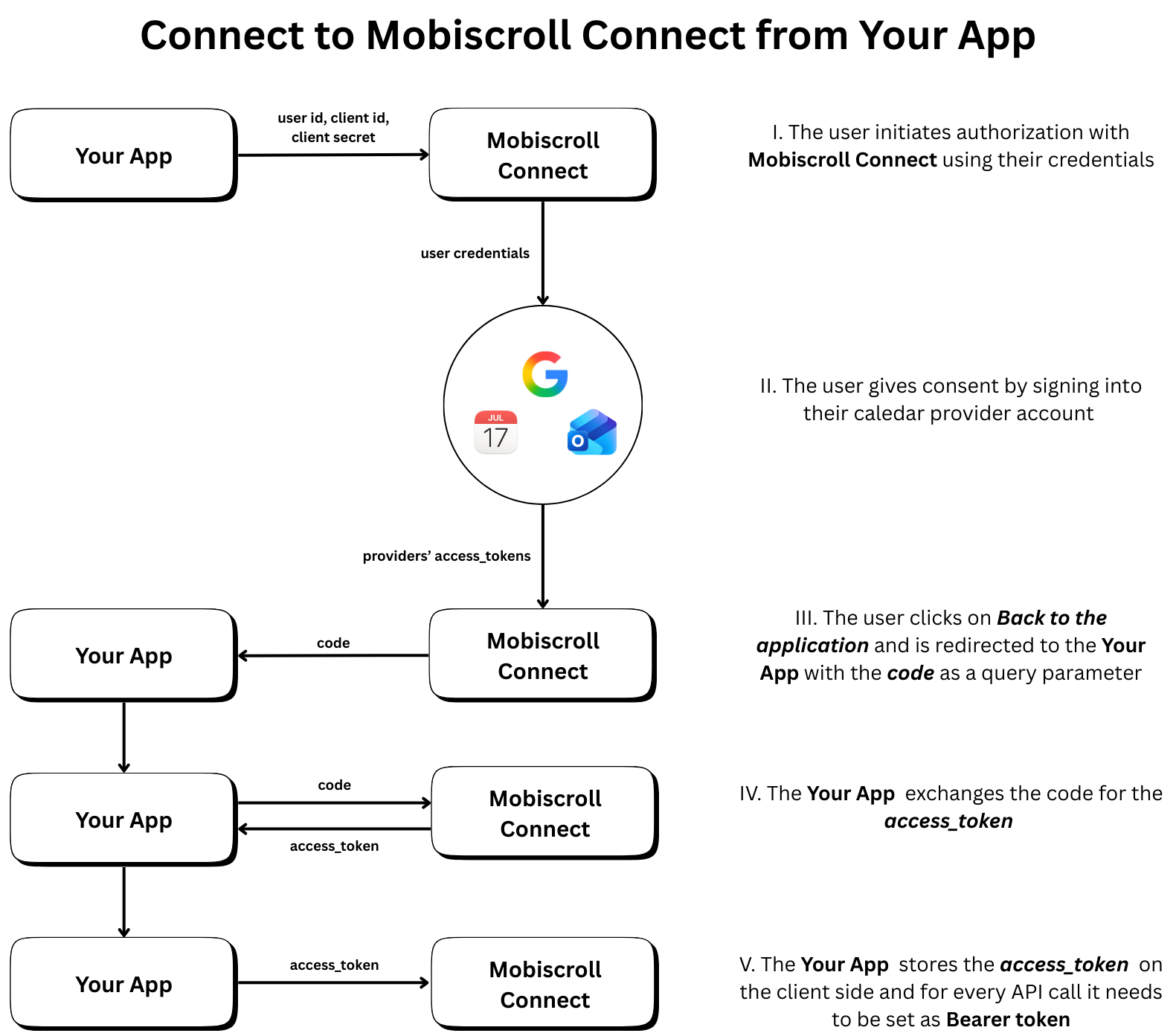
Most API endpoints require authentication using a Bearer token (JWT). Include the token in the Authorization header:
Authorization: Bearer YOUR_JWT_TOKEN
Exception: The OAuth authorization endpoint does not require authentication as it initiates the OAuth flow.
To obtain an access token:
- Direct users to the GET /authorize endpoint to initiate the OAuth2 flow
- Users will authenticate with their calendar provider(s)
- After successful authentication, they'll be redirected to your
redirect_uriwith an authorization code - Exchange the authorization code for an access token using POST /token
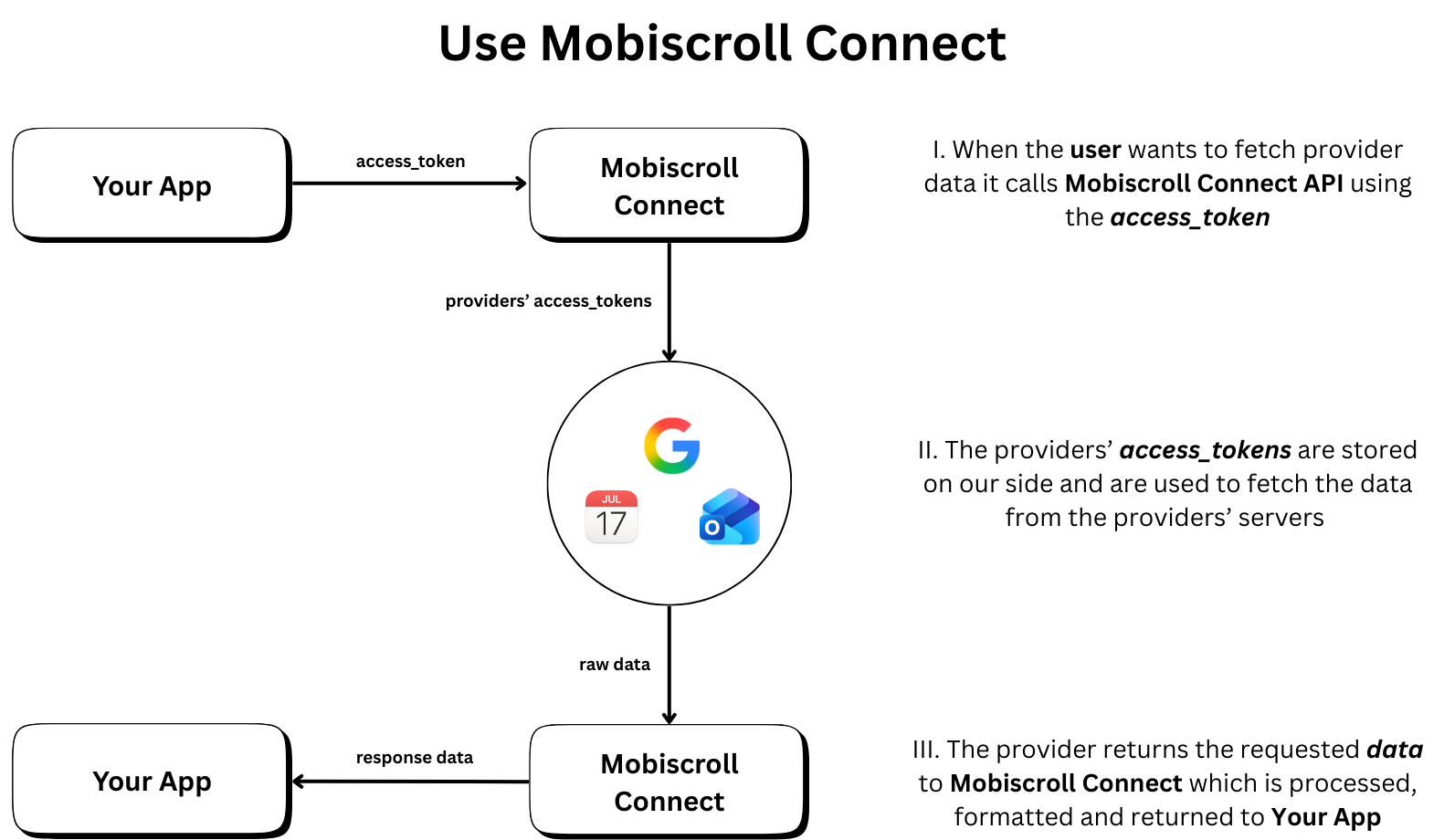
- Use the access token in the
Authorizationheader for all subsequent API requests
Available Endpoints
OAuth API
Initiate and complete the OAuth2 authorization flow to connect user calendar accounts, and manage those connections.
- GET /authorize - Initiate OAuth2 authorization flow
- POST /token - Exchange authorization code for access token
- POST /token - Refresh access token using a refresh token
- GET /connection-status - List the user's connected calendar accounts and their state
- POST /disconnect - Disconnect a calendar account, or every account of a provider
- POST /revoke - Revoke all active tokens for a user
Events API
Retrieve, create, update, and delete calendar events from connected providers with support for pagination, filtering, and recurring events.
- GET /events - Fetch calendar events with advanced filtering and pagination
- POST /event - Create a new calendar event
- PUT /event - Update an existing calendar event
- DELETE /event - Delete a calendar event
Calendars API
Manage calendar lists across all connected providers.
- GET /calendars - Retrieve all calendars from connected providers
Webhooks API
Subscribe calendars and receive normalized event change notifications from Google, Microsoft, Apple, and CalDAV (polling-based for Apple and CalDAV).
- POST /subscribe-webhook - Create a webhook subscription for a calendar
- POST /unsubscribe-webhook - Remove an existing webhook subscription
- GET https://connect.mobiscroll.com/.well-known/webhook-keys - Fetch the public keys that verify delivery signatures (served from the domain root, not under
/api)
Supported Providers
Mobiscroll Connect supports the following calendar providers:
- Google Calendar (
'google') - Microsoft Outlook (
'microsoft') - Apple Calendar (
'apple') - CalDAV (
'caldav')
Base URL
All API requests should be made to:
https://connect.mobiscroll.com/api
Response Format
All API responses are returned in JSON format. Successful responses include the requested data, while error responses include an error field (the event write endpoints use message) with a descriptive message.
Error Handling
Standard HTTP status codes are used to indicate the success or failure of requests:
- 200 - Success
- 201 - Created (
POST /event) - 202 - Accepted (async operations)
- 204 - No Content (
DELETE /event) - 400 - Bad Request (invalid parameters)
- 401 - Unauthorized (invalid or missing token)
- 403 - Forbidden (the token's scope does not allow the request)
- 404 - Not Found (resource doesn't exist)
- 429 - Too Many Requests (see Rate limits)
- 500 - Internal Server Error (unexpected failure)
Rate limits
Requests are limited per client IP address, across all endpoints except the health check:
- 50 requests per second
- 500 requests per minute
A request over either limit is answered with 429 and { "error": "Too many requests, please try again later." }. The response carries a Retry-After header with the number of seconds until the current window resets, and responses also carry RateLimit-Policy and RateLimit headers in the IETF draft format. Wait at least Retry-After seconds before retrying, and spread bulk work — for example, syncing many users at once — over time rather than sending it in a burst.
Because the limit is per IP address, all requests from one server share it, including requests made on behalf of different users.
